
Prospectus registration eROC: submitting a prospectus in 11 steps
How to register a prospectus on eROC: what section 40 of the Companies Act asks for, the SEC copy that comes first, each live screen in order and the fee.
On this page
Last verified against the primary sources on 3 November 2026.
Prospectus registration eROC, in brief. Under section 40 of the Companies Act No. 7 of 2007, a prospectus may not be issued unless a copy signed by every person named in it as a director or proposed director, or by an agent authorised in writing, has been delivered to the Registrar of Companies Sri Lanka for registration on or before its publication date. On eROC this is Submission of Prospectus for Registration under Other Changes [1][2]. For an issue of securities to the public, section 82(2) of the Securities and Exchange Commission of Sri Lanka Act No. 19 of 2021 also requires a copy to be lodged with the SEC before that registration [5].
This guide covers the prospectus registration eROC filing in the order the screens open. It follows one hypothetical unlisted public company, Company A, through eleven steps: steps 1 to 3 come from the Act, section 27 in Part II and the prospectus provisions in Part IV, sections 36 to 44, and steps 4 to 11 are the eROC screens. Each labelled diagram, redrawn from the DRC Process B user guide, is placed beside the matching live eROC screen, captured on 31 October 2026 with company details blocked. For the shares a prospectus offers and how an issue is notified once allotted, see our guide to the issue of shares on Form 6; the Form 6 eROC tutorial in this series shows its screens. For the full filing calendar, see our map of company secretarial requirements in Sri Lanka.
Part IV of the Act sets what must reach the Registrar
The prospectus sections sit in Part IV, Shares and Debentures, under the heading Prospectus, from section 36 to section 44; step 1 rests on section 27, in Part II, Private Companies [1]. For a series of debentures, see the Form 10A filing.
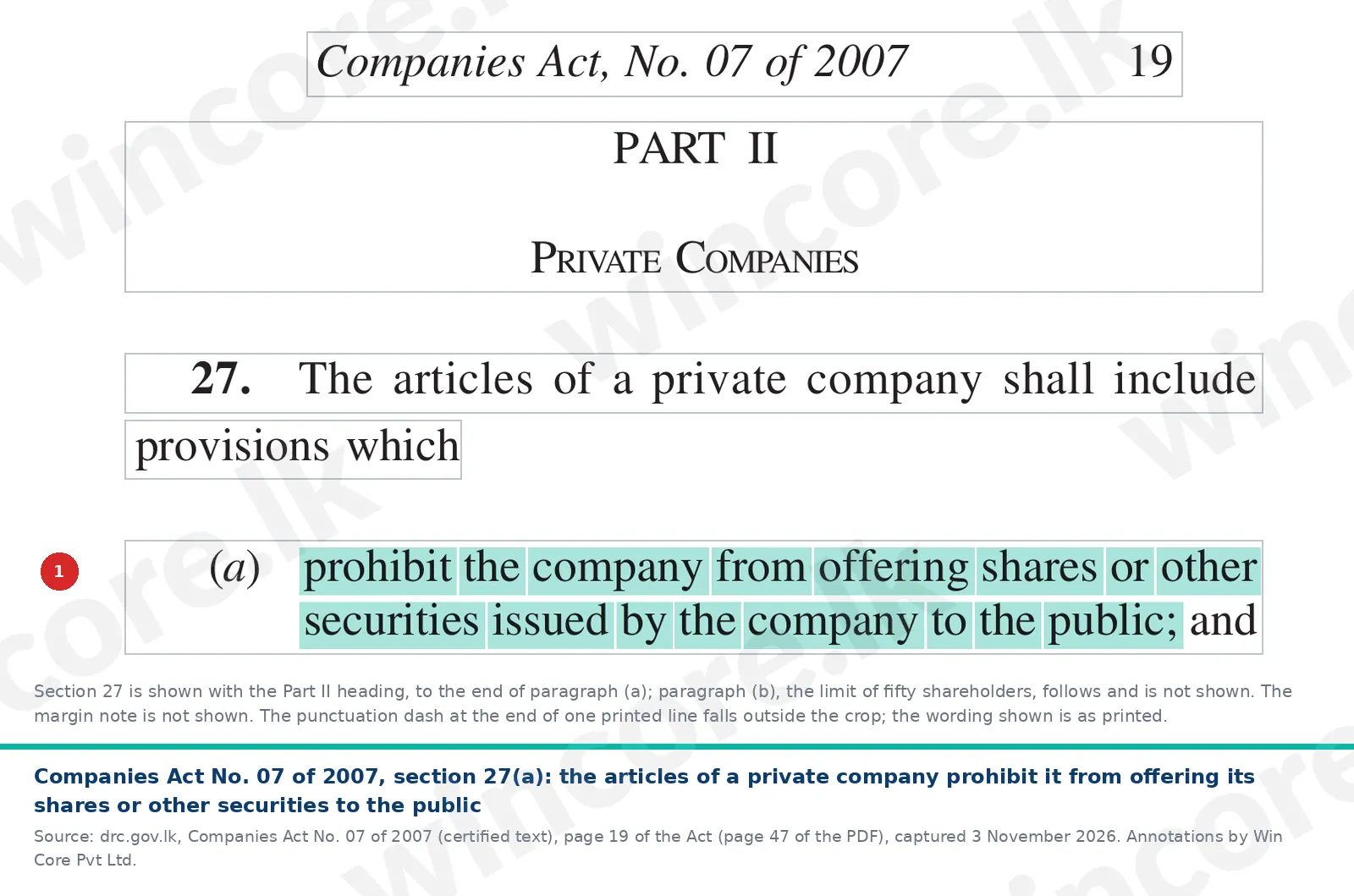
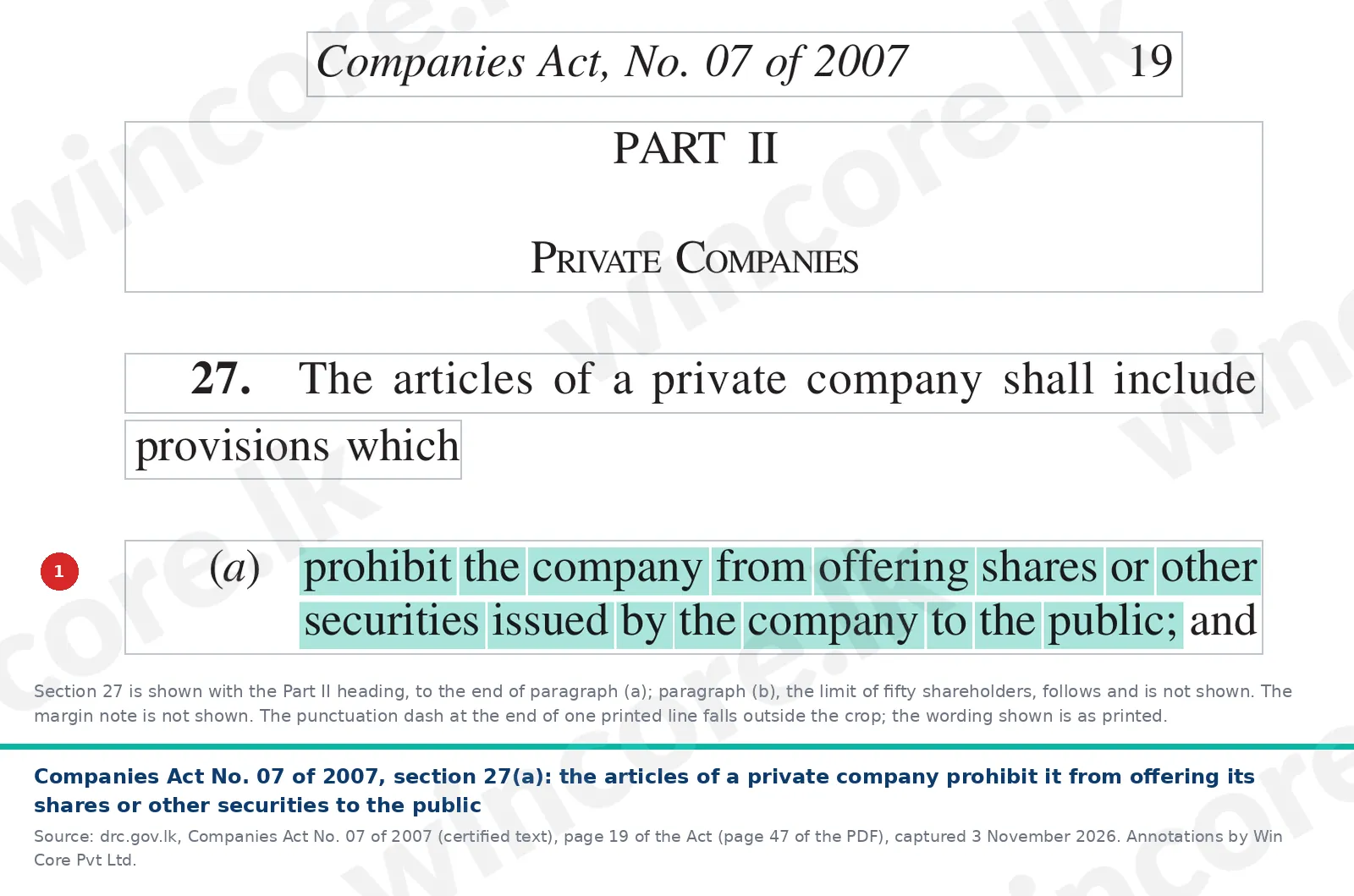
- Check that the company may offer to the public. Section 27(a) requires the articles of a private company to "prohibit the company from offering shares or other securities issued by the company to the public" [1]. On our reading, a prospectus is therefore for a public company or one being formed as public. The live screens in this guide were captured on a private company record, only to show the layout.
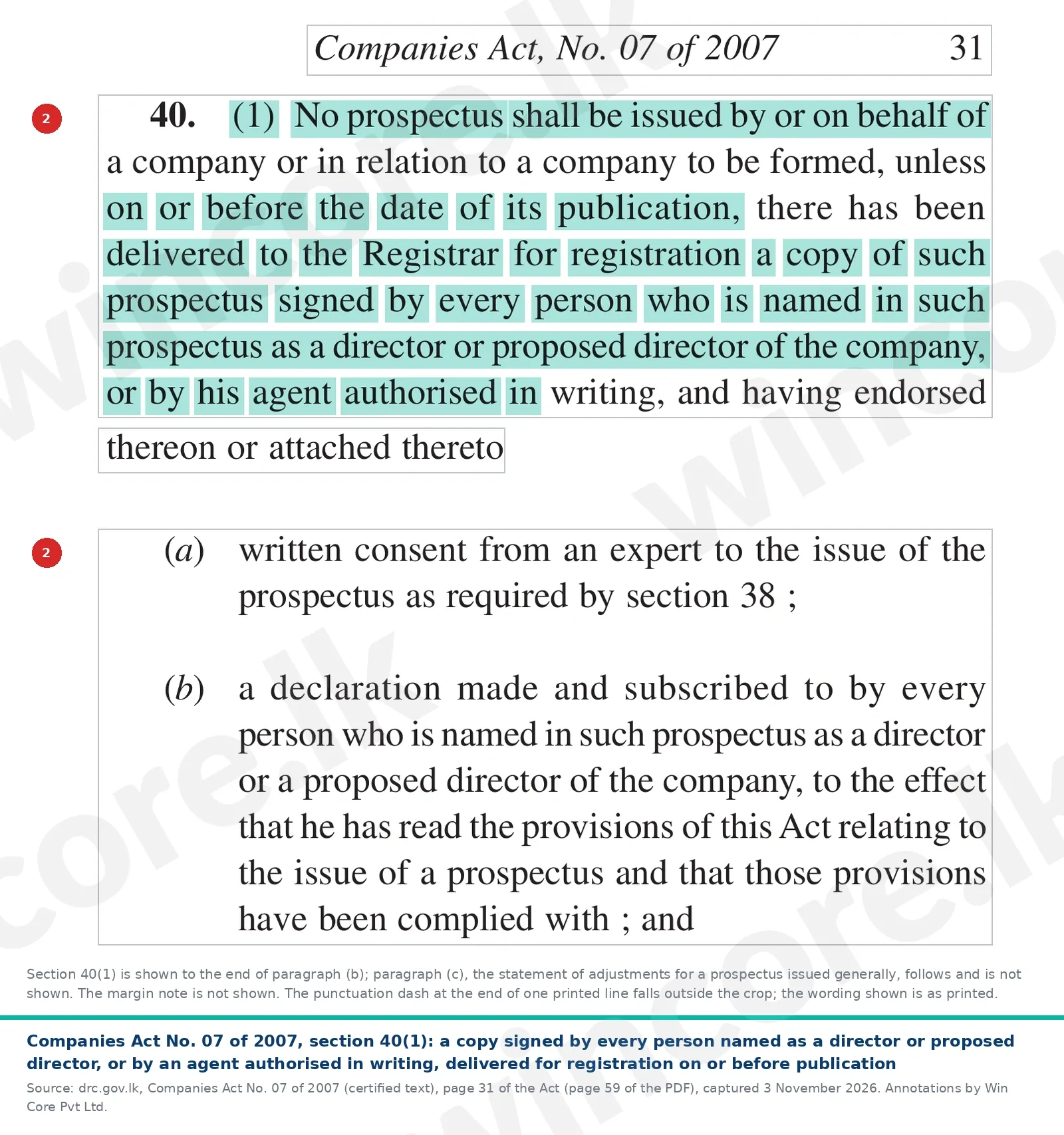
- Date it, then deliver a signed copy on or before publication. Section 36 says a prospectus "shall bear a date", which, "unless the contrary is proved", is taken as its publication date [1]. Section 40(1) says "No prospectus shall be issued by or on behalf of a company or in relation to a company to be formed, unless on or before the date of its publication, there has been delivered to the Registrar for registration a copy of such prospectus signed by every person who is named in such prospectus as a director or proposed director", or by an agent authorised in writing [1]. Attached to it are any expert's written consent required by section 38 (where the prospectus includes an expert's statement), a declaration by each person named as a director or proposed director that the prospectus provisions have been complied with, and any statement of adjustments to the Fourth Schedule reports [1].
Section 37(1) says every prospectus must contain the information in Part I of the Fourth Schedule and set out the reports in Part II, subject to Part III; section 37(6) disapplies section 37 for an issue made only to existing shareholders or debenture holders [1]. Section 40(2) requires the prospectus to state on its face that a copy has been delivered for registration [1].
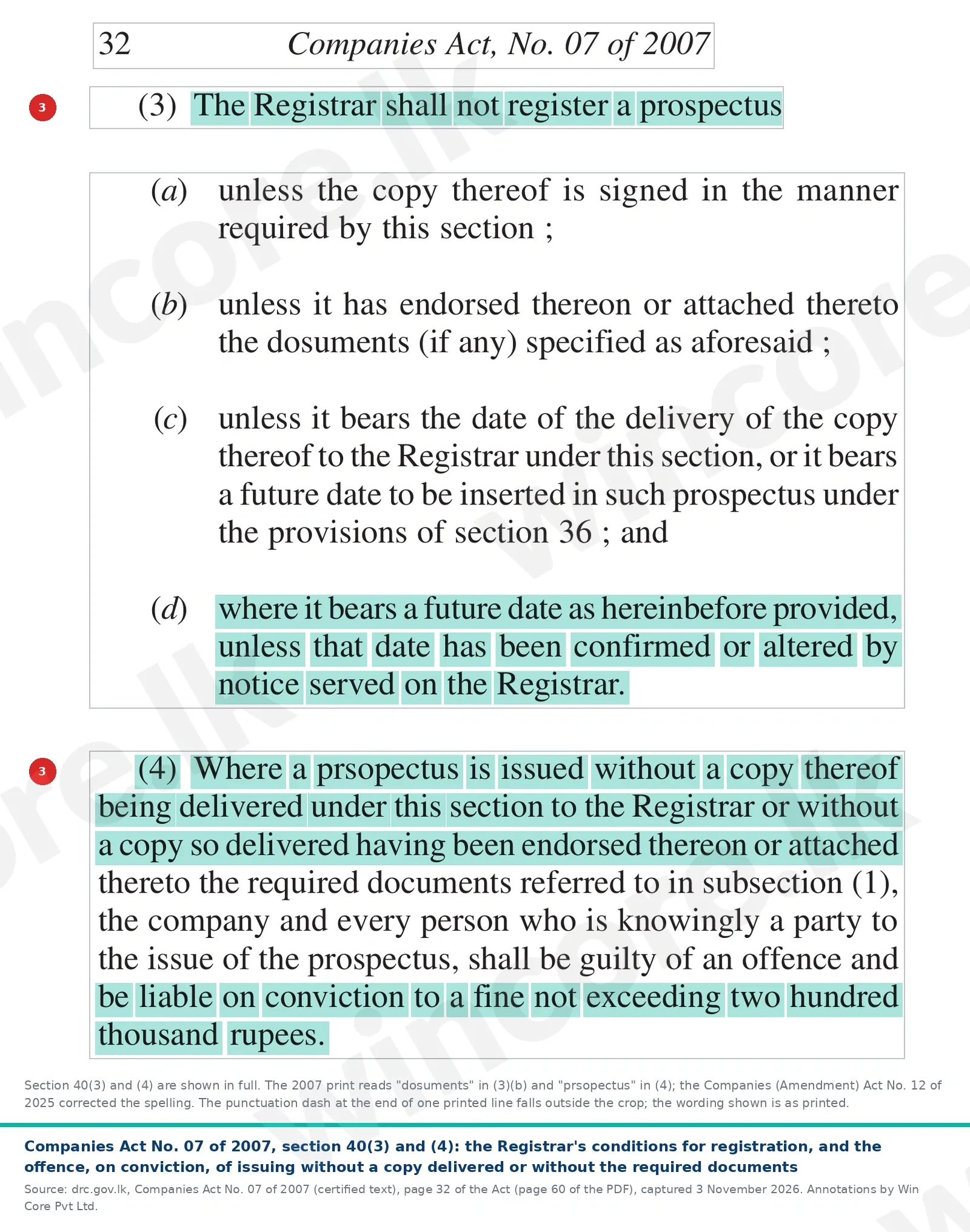
- Meet the Registrar's conditions. Section 40(3) says "The Registrar shall not register a prospectus" unless the copy is signed as required, carries the required documents, and bears the date of delivery, or a future date inserted under section 36 that has been confirmed or altered by notice served on the Registrar [1]. Under section 40(4), issuing a prospectus without delivering a copy to the Registrar, or where the copy delivered lacks the required documents, makes the company and every person knowingly a party to the issue liable on conviction to a fine of up to Rs 200,000 [1].
Section 42(1) adds criminal liability for an untrue statement: a fine of up to Rs 500,000, up to two years' imprisonment, or both, for a person who authorised the issue, unless he proves the statement was immaterial or that he had reasonable ground to believe, and did believe, it was true; a prosecution needs the Attorney-General's sanction (section 42(3)). Section 41 sets civil liability to subscribers [1]. The Companies (Amendment) Act No. 12 of 2025, in operation from 30 March 2026, changed only wording here: spelling in sections 37(3)(a), 40(3)(b), 40(4), 41(2)(c) and 44(b), a reworded marginal note to section 41, and corrections in the Fourth Schedule, where Part II paragraph 22(1)(a) now reads "shares and debentures" [3]. Our guide to the 2025 amendment covers its real changes.
A public issue also goes to the SEC before Registrar registration
Section 82(2) of the Securities and Exchange Commission of Sri Lanka Act No. 19 of 2021 says a person making an issue of securities to the public "shall lodge a copy of the prospectus or a similar document with the Commission or with any person authorised by the Commission for that purpose prior to registration of the prospectus as required under the Companies Act, No. 7 of 2007" [5]. Under section 80, a listed public company, or a public company that has applied for a listing, may not make a public offer by prospectus "unless approved by the Commission or a person authorised by the Commission"; for listed securities the SEC says this approval is granted by the Colombo Stock Exchange under its Listing Rules [5][6]. Section 80 also lets the SEC require approval by rules for some unlisted offers, and section 82(1) adds the SEC's requirements and the exchange's rules to the Companies Act contents. So for a listed offer, registration with the Registrar is not the only approval needed. On our reading, section 82(2) also reaches an unlisted company's public issue of shares; whether it does turns on the SEC Act's definition of securities, which this guide has not checked, and the SEC's rules for unlisted offers and the CSE Listing Rules are not covered here.
The prospectus registration eROC filing opens from Other Changes
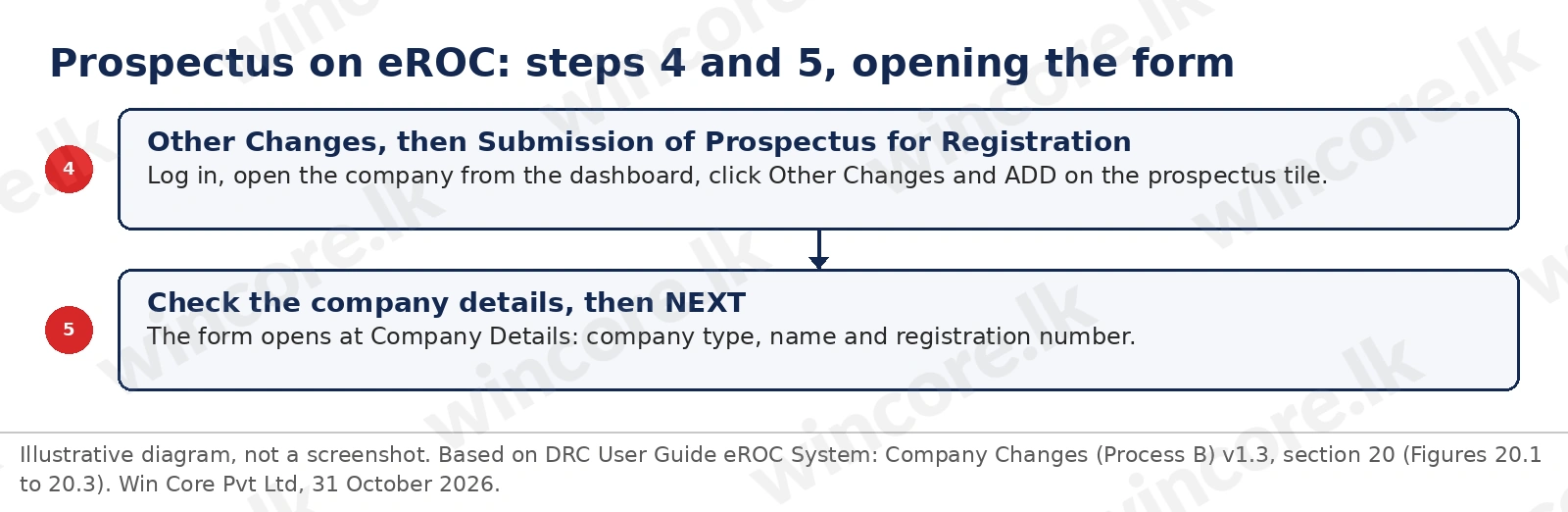
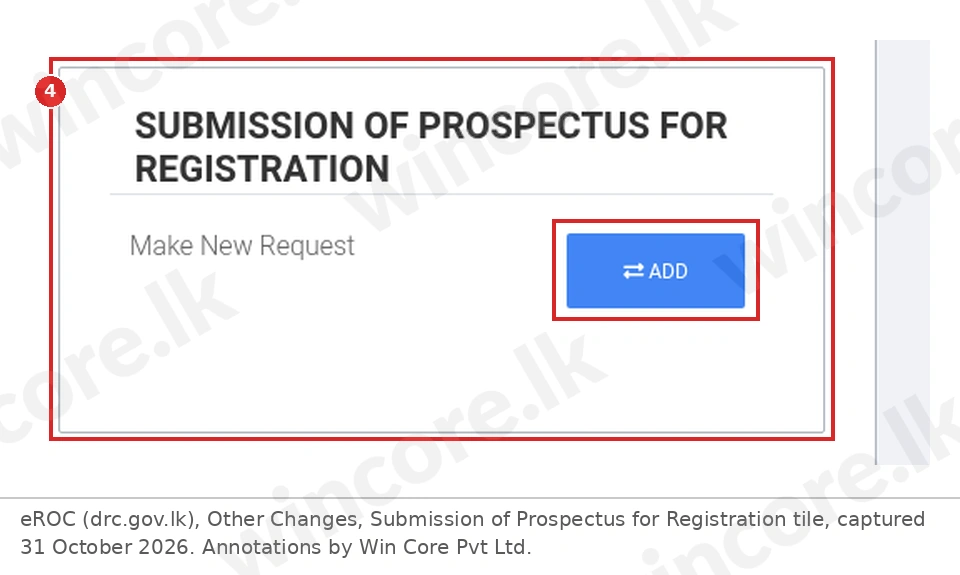
The guide says "The applicant will have to select 'SUBMISSION OF PROSPECTUS FOR REGISTRATION' in order to submit a prospectus" [2]. Figure 4 shows the opening steps.
- Log in, open the company, click Other Changes, then ADD on the Submission of Prospectus for Registration tile [2].
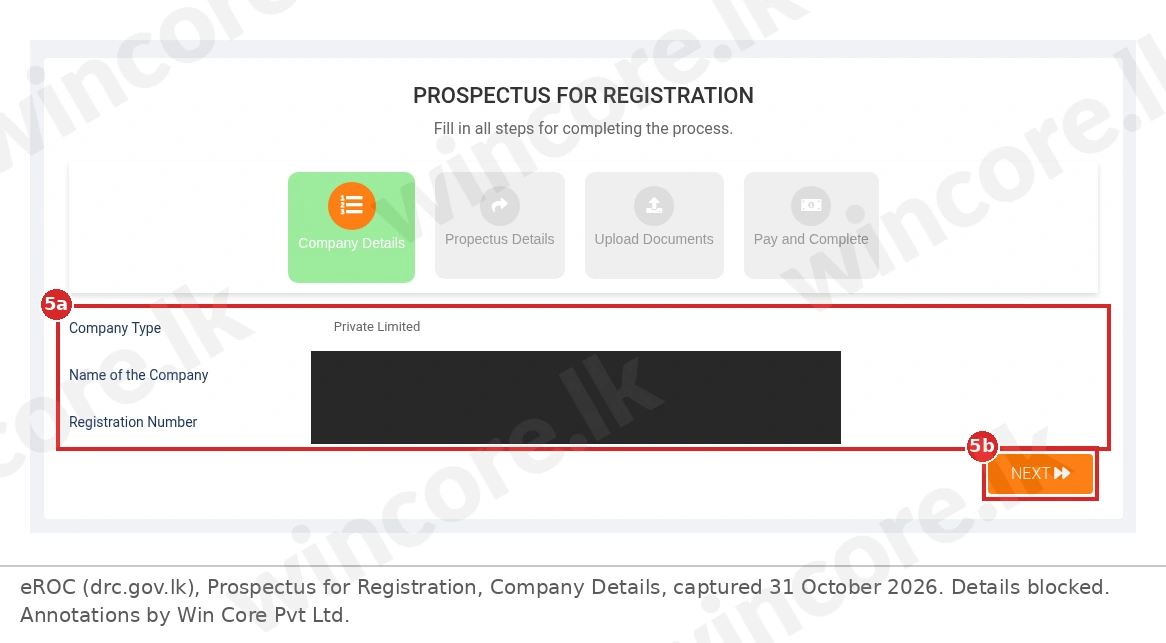
- Check the company details (5a) and click NEXT (5b). The live form, titled Prospectus for Registration, has four steps: Company Details, Propectus Details (spelled that way on screen), Upload Documents and Pay and Complete.
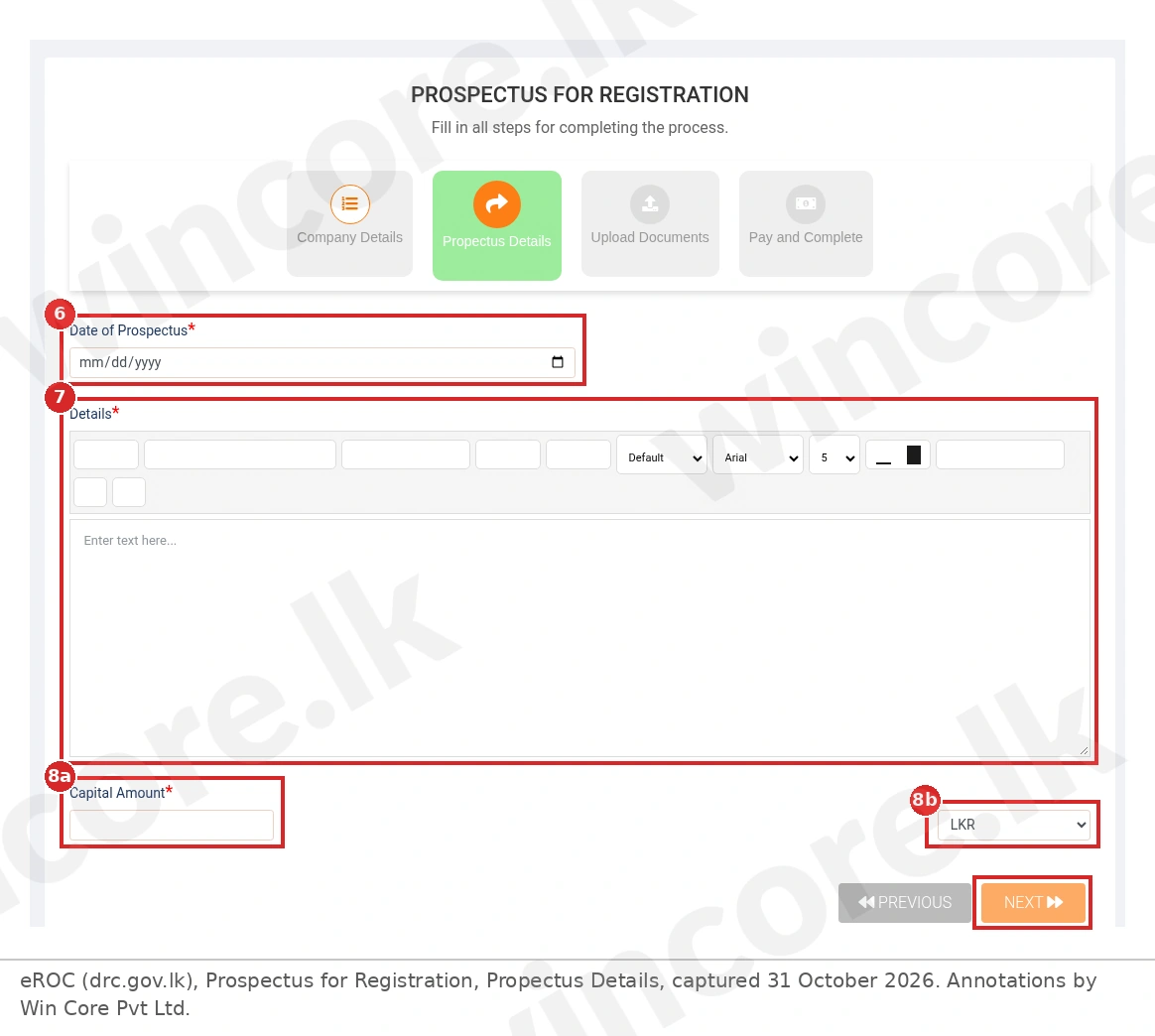
The Prospectus Details step takes the date, the details and the capital
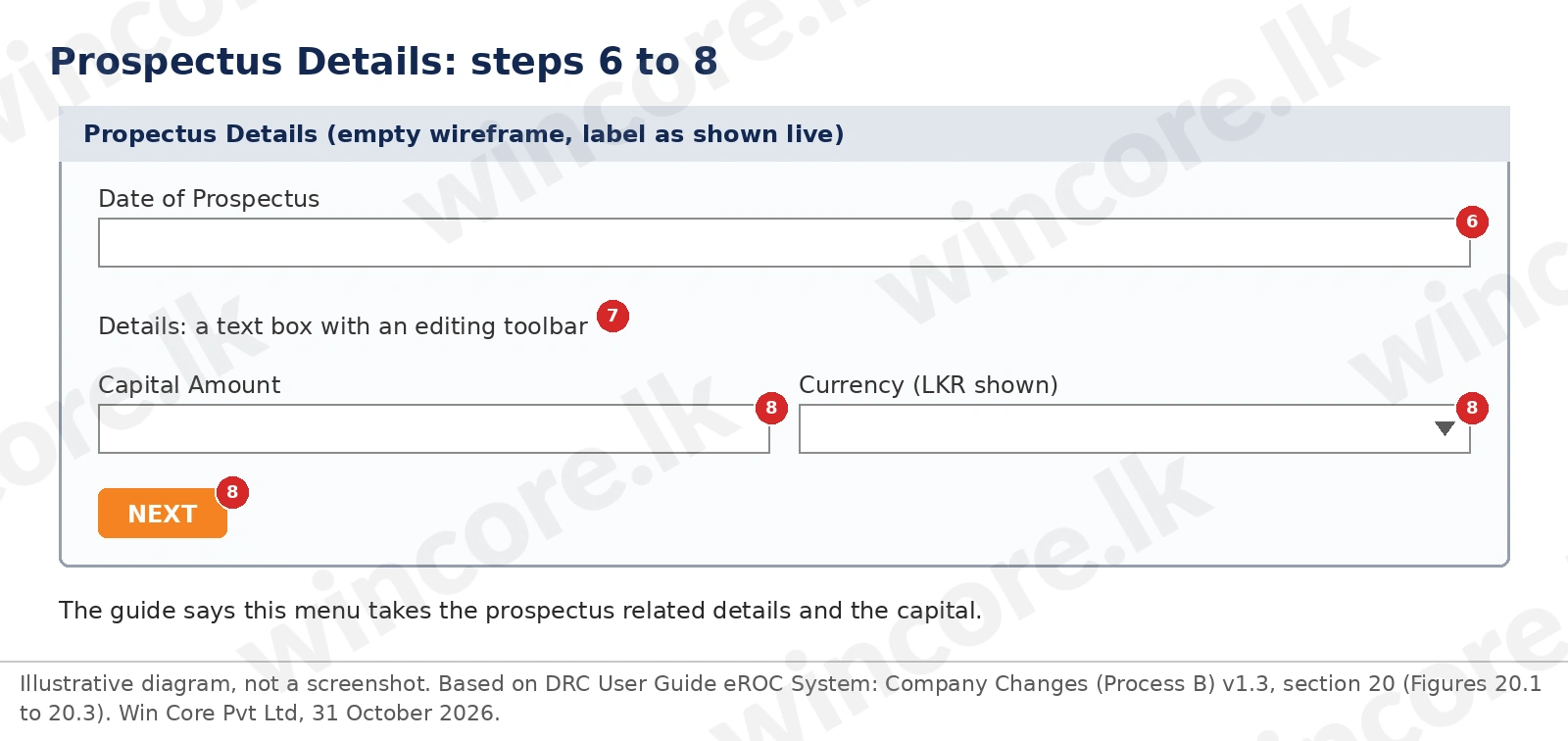
The guide says the applicant is directed to a menu "to enter prospectus related details and the capital" [2]. Figure 7 shows it as an empty wireframe.
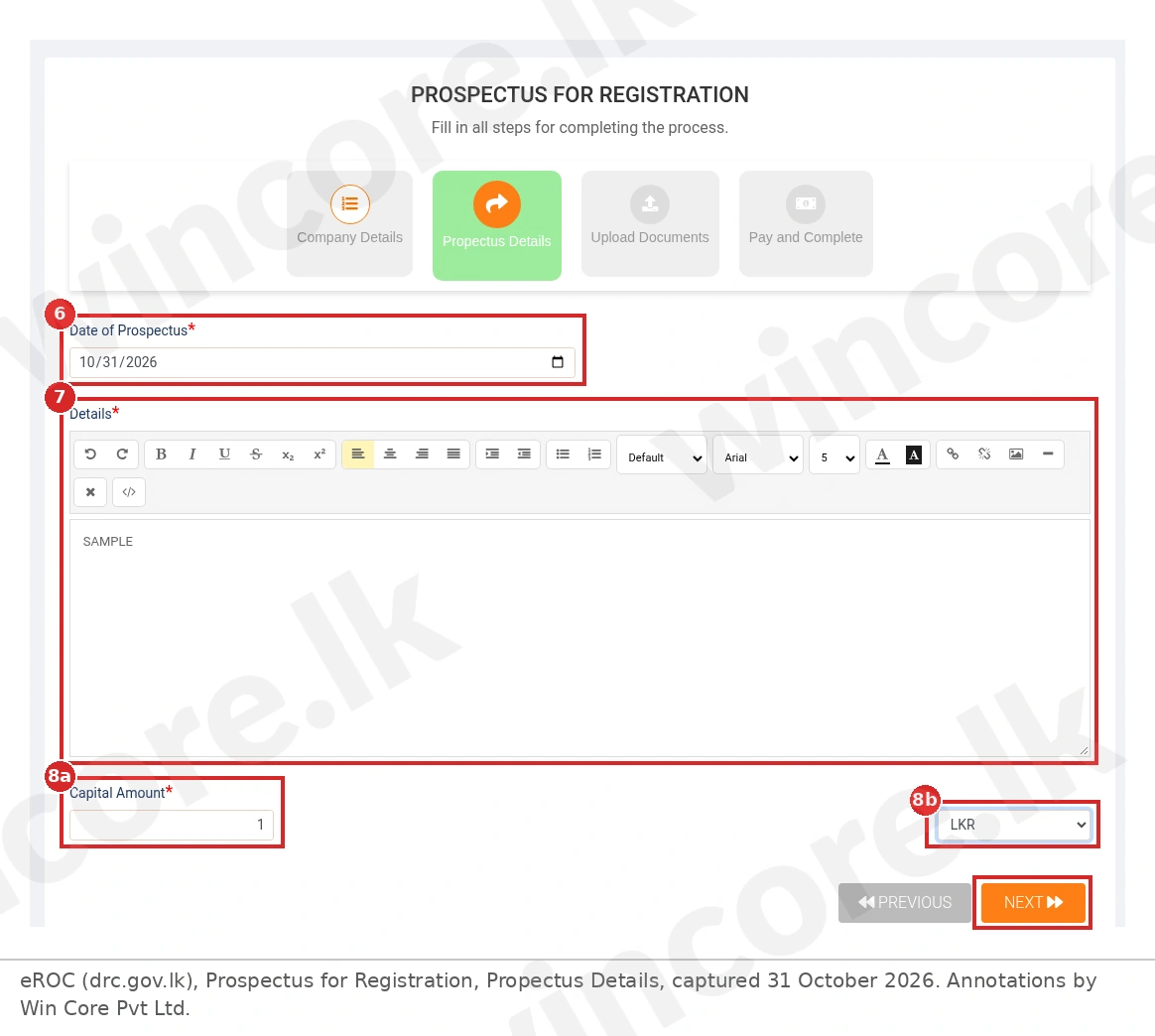
- Enter the Date of Prospectus. This is the section 36 date, and on our reading it is the date section 40(3)(c) checks.
- Type the Details. The live Details box is a text editor with a formatting toolbar.
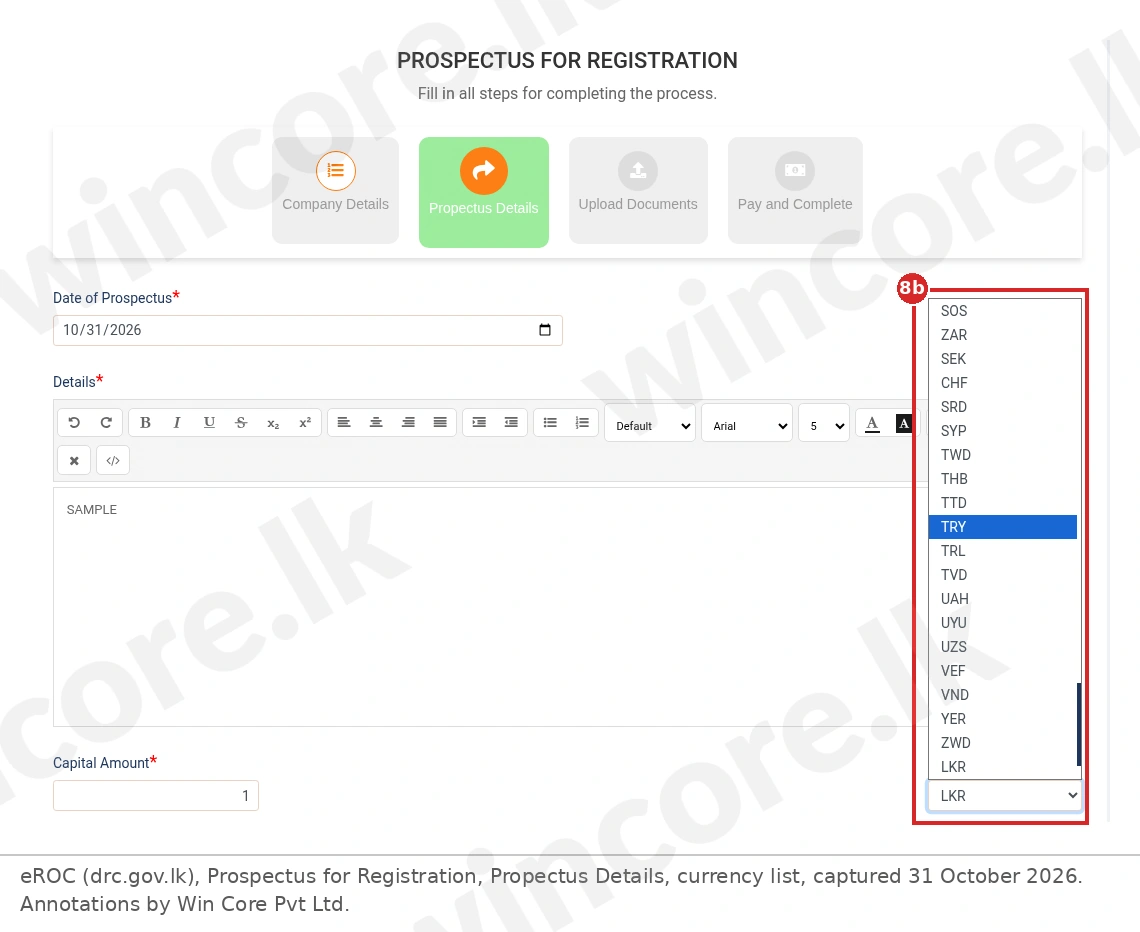
- Enter the Capital Amount (8a) and choose the currency (8b), then NEXT. The currency dropdown starts at LKR. It is a list of currency codes; Figure 9 shows its end open, from SOS to ZWD, with LKR last. The earlier codes are not listed here.
Upload the signed prospectus, tick and pay
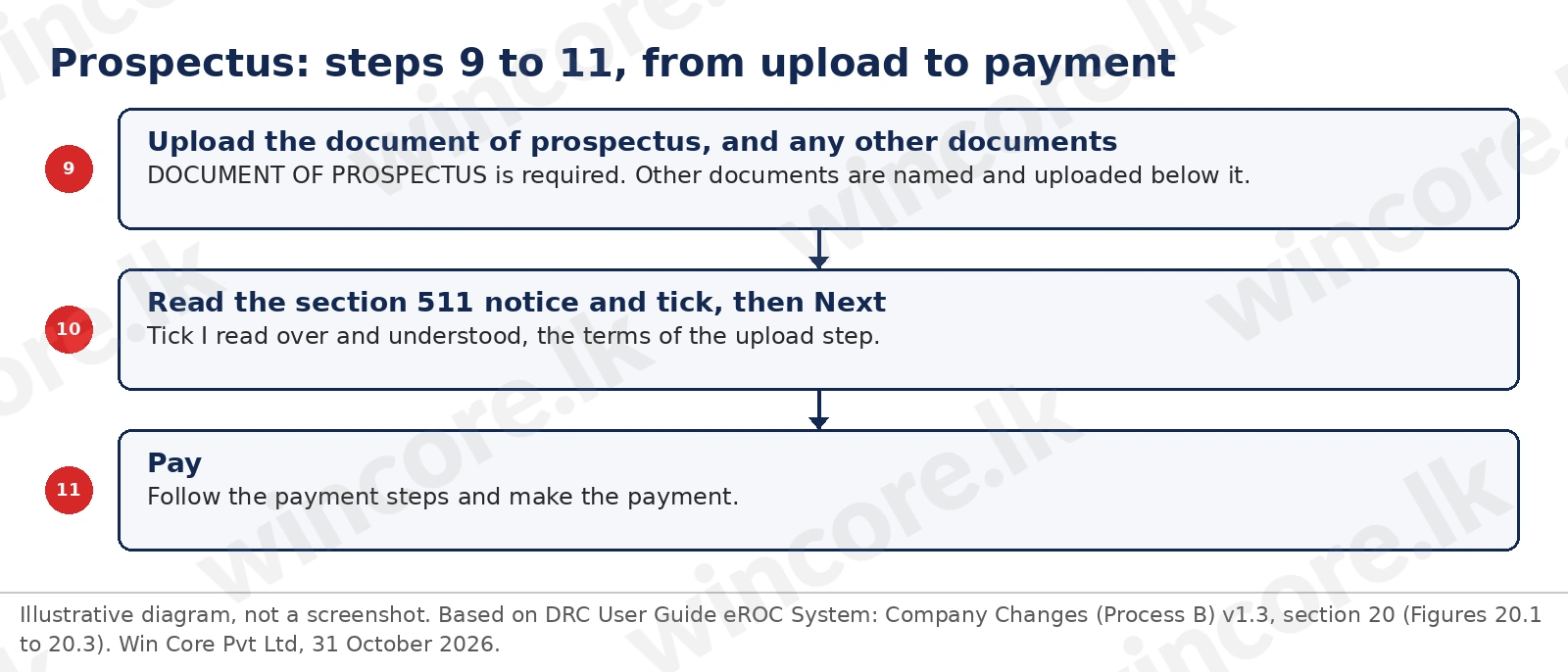
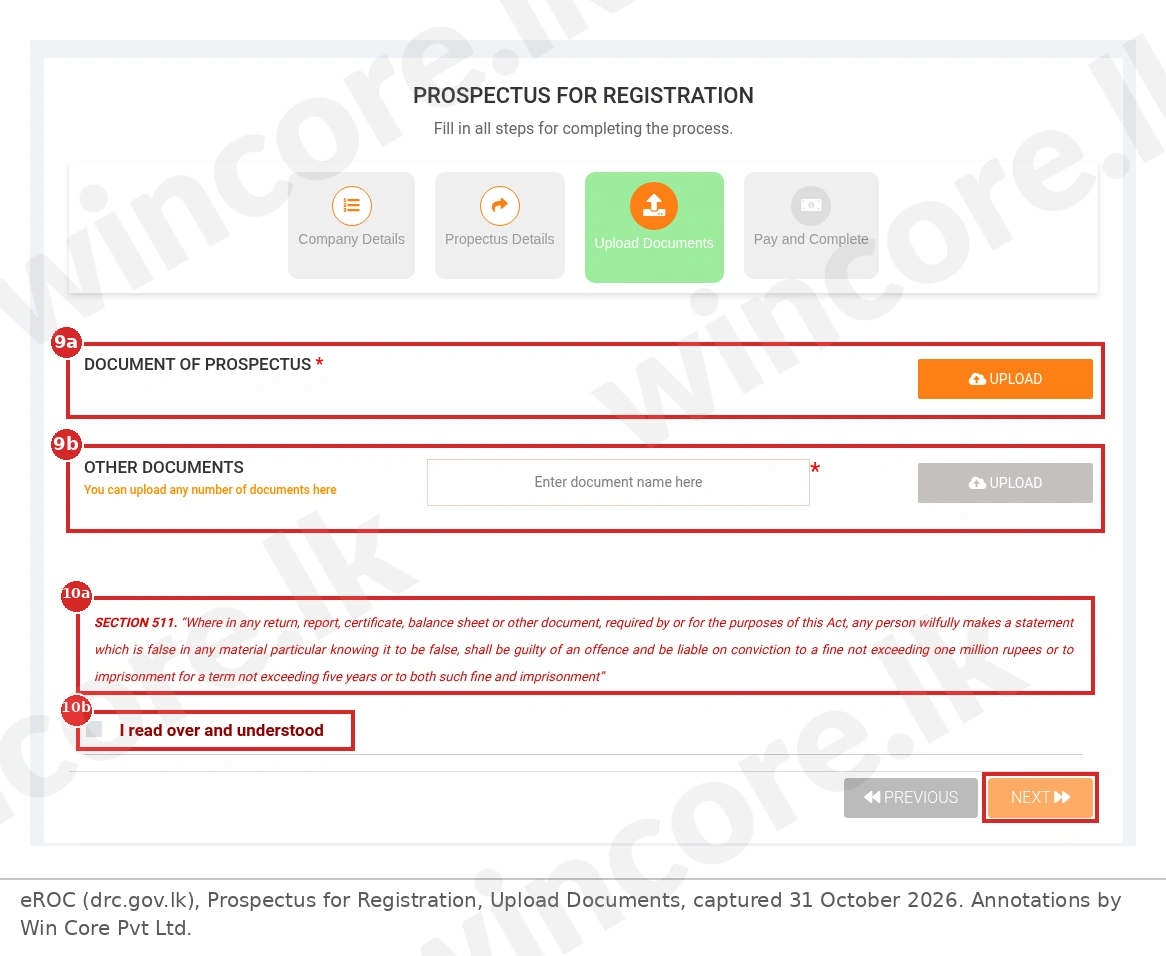
Figure 11 shows the last three steps.
- Upload the document of prospectus (9a) and any other documents (9b). The live screen has a required DOCUMENT OF PROSPECTUS upload and an OTHER DOCUMENTS row: "You can upload any number of documents here". On our reading, the section 40(1) consents and declarations go in as other documents if they are not attached to the prospectus file itself.
- Read the section 511 notice (10a) and tick "I read over and understood" (10b), then Next. The guide says the applicant must "tick the terms and conditions and click on the 'Next' button in the upload section" [2].
- Pay. "Follow the payment steps and make the payment successfully" [2]. On our reading, the fee is item 7 of the Gazette 2496/03 schedule, Rs 2,600 excluding VAT [4]; the Pay and Complete screen is not shown in this guide, so check the amount eROC displays and any later fee Order.
Worked example: Company A plans a public issue
Company A, an unlisted public company not seeking a listing, with three directors named in the prospectus and no proposed directors, plans to publish a prospectus on Day 10 offering Rs 50,000,000 of new shares.
| Item | Working | Result |
|---|---|---|
| Signatures, section 40(1) | Every named director, or an agent authorised in writing | 3 signatures |
| Director declarations, section 40(1)(b) | One for each named director | 3 declarations |
| Expert consent, sections 38 and 40(1)(a) | Where the prospectus has an expert's statement | Attached |
| Latest delivery to the Registrar | On or before the publication date | Day 10 |
| SEC lodgement, SEC Act section 82(2) | A copy lodged with the SEC or a person it authorises | Before the Registrar registers it |
| Date of Prospectus on eROC | The date the prospectus bears | Day 10 |
| Capital Amount | The amount offered, on our reading (the guide does not define the field) | Rs 50,000,000, LKR |
| Fee, Gazette 2496/03 item 7, with VAT at 18 percent, on our reading [4][7] | Rs 2,600 + Rs 468 | Rs 3,068 |
Section 40(3)(c) and (d) let the Registrar register a copy that bears the date of delivery, or a future date inserted under section 36 that is later confirmed or altered by notice served on the Registrar. So Company A either delivers on Day 10 with the prospectus dated Day 10, or delivers earlier with Day 10 inserted as a future date and then confirms that date by notice. Once shares are allotted, each issue is notified on Form 6; our share capital guide explains how stated capital grows. Check the fee and the VAT rate again before filing, in case of any later change.
What this means for you
Work backwards from the publication date: the signed copy and its attachments must reach the Registrar on or before that day, a copy must be lodged with the SEC, or a person it authorises, before that registration (SEC Act section 82(2)), and a listed company or one seeking a listing needs SEC or CSE approval before making the offer (section 80). Collect every named director's or proposed director's signature and declaration and any expert consent first, then open the prospectus tile with the date, details and capital to hand. On our reading, a private company cannot use this route while its articles carry the section 27(a) prohibition; it would first alter its articles by special resolution, which ends its private status (sections 28(1) and 92(1)). Our guide to changing the articles of association covers that filing. Our corporate secretarial services include Statutory Compliance and Corporate Document Maintenance if you want the signatures and dates tracked; that is the Registrar filing, not advice on the SEC or exchange side of a public offer.
Checklist: documents needed
- The prospectus, dated, with the Fourth Schedule information and reports
- The signature of every named director or proposed director, or a written agent authority
- A declaration by each named director or proposed director under section 40(1)(b)
- Any expert's written consent under section 38
- Proof that a copy was lodged with the SEC, and for a listed offer the SEC or CSE approval
- Access to the company on eROC as a director or secretary
- The capital amount offered, and Rs 3,068 for the fee on our reading
FAQ
When must a prospectus be delivered to the Registrar?
On or before the date of its publication. Section 40(1) of the Companies Act No. 7 of 2007 says no prospectus may be issued unless a copy signed by every named director or proposed director, with the required consents and declarations, has been delivered to the Registrar for registration by then. Section 36 makes the date it bears its publication date unless the contrary is proved [1].
Can a private company register a prospectus?
No, on our reading. Section 27(a) of the Companies Act requires a private company's articles to prohibit it from offering its shares or other securities to the public, and section 529 defines a prospectus as an invitation "offering to the public". The company would first alter its articles, ending its private status under section 28(1); both steps need a special resolution under section 92(1)(a) and (g) [1].
What does the eROC prospectus form ask for?
On the live screens captured on 31 October 2026, the Propectus Details step asks for the Date of Prospectus, a Details text box and the Capital Amount with a currency, shown as LKR. The Upload Documents step asks for the document of prospectus, any other documents and an "I read over and understood" tick under the section 511 notice [2].
What happens if a prospectus is issued without delivering a copy to the Registrar?
Section 40(4) makes the company and every person knowingly a party to the issue liable on conviction to a fine of up to Rs 200,000, whether no copy was delivered or the copy lacked the required documents. Under section 42, a person who authorised a prospectus with an untrue statement faces up to Rs 500,000, two years' imprisonment, or both, unless a defence applies; prosecution needs the Attorney-General's sanction [1].
Does a prospectus also need SEC approval?
For a listed company, or one that has applied for a listing, yes. Section 80 of the SEC Act No. 19 of 2021 bars its public offer by prospectus unless the SEC or a person it authorises approves it, and the SEC says the CSE grants this for listed securities. Any public issue also needs a copy lodged with the SEC first (section 82(2)) [5][6].
The short version
Prospectus registration eROC is the section 40 filing that must reach the Registrar on or before a prospectus is published, signed by every named director or proposed director with the consents and declarations attached, after a copy has been lodged with the SEC (and, for a listed offer, approved by the SEC or the CSE). On eROC, open Other Changes and the prospectus tile, check the company details, enter the date, details and capital, upload the prospectus and other documents, tick under the section 511 notice and pay.
Talk to us. For tracking prospectus signatures, declarations and dates through our Statutory Compliance and Corporate Document Maintenance work, see our company secretarial page or book a consultation at our contact page.
WinCore Pvt Ltd
This article is general information as at 3 November 2026 and is not tax, legal or accounting advice on your specific position.
References
- Department of the Registrar of Companies. Companies Act, No. 07 of 2007, sections 27, 28(1), 36, 37(1) and (6), 38, 40(1) to (4) including 40(3)(d), 41, 42(1) to (3), 92(1)(a) and (g), 511 and 529. https://drc.gov.lk/en/wp-content/uploads/2018/04/Act-7-of-2007-English.pdf . Primary. Accessed 3 November 2026.
- Department of the Registrar of Companies. User Manual e-ROC System, Process B (Public Interface), version 1.3 (24 October 2020), section 20. https://erocapiv2.drc.gov.lk/pdf/Process%20b_frontend_V1.3.pdf . Primary. Accessed 3 November 2026.
- Parliament of Sri Lanka. Companies (Amendment) Act, No. 12 of 2025, section 21 and Schedule items 3 to 8 and 86 to 91, in operation from 30 March 2026 (Gazette Extraordinary No. 2480/47). https://www.parliament.lk/uploads/acts/gbills/english/6389.pdf . Primary. Accessed 3 November 2026.
- Minister of Trade, Commerce, Food Security and Co-operative Development. Companies (Fees) Orders, Gazette Extraordinary No. 2496/03 of 6 July 2026, Schedule item 7. https://drc.gov.lk/en/wp-content/uploads/2026/07/2496-03_E.pdf . Primary. Accessed 3 November 2026.
- Securities and Exchange Commission of Sri Lanka. Securities and Exchange Commission of Sri Lanka Act, No. 19 of 2021, sections 80 to 83. https://www.sec.gov.lk/wp-content/uploads/2021/09/PL-012514-E-Securities.pdf . Primary. Accessed 3 November 2026.
- Securities and Exchange Commission of Sri Lanka. Approvals. https://www.sec.gov.lk/approvals/ . Primary (regulator page). Accessed 3 November 2026.
- Inland Revenue Department. Value Added Tax (VAT) page, VAT rates (18 percent from 1 January 2024); PN/VAT/2024-01. https://www.ird.gov.lk/en/type%20of%20taxes/sitepages/value%20added%20tax%20%28vat%29.aspx . Primary. Accessed 3 November 2026.
Put these insights to work
WinCore specialists can review your current workflow, document gaps, and build a practical 90-day action plan.
Book a free consultationContinue reading
Explore more WinCore analysis to keep your finance, tax, and compliance roadmap moving.

No minimum share capital applies to a resident private company. How much to put in as stated capital, how much to lend, and the half-of-capital test.
Issue new shares under the Companies Act: the board resolution, pre-emption, the twenty-working-day Form 6 and BO 2 deadlines, and stamp duty.
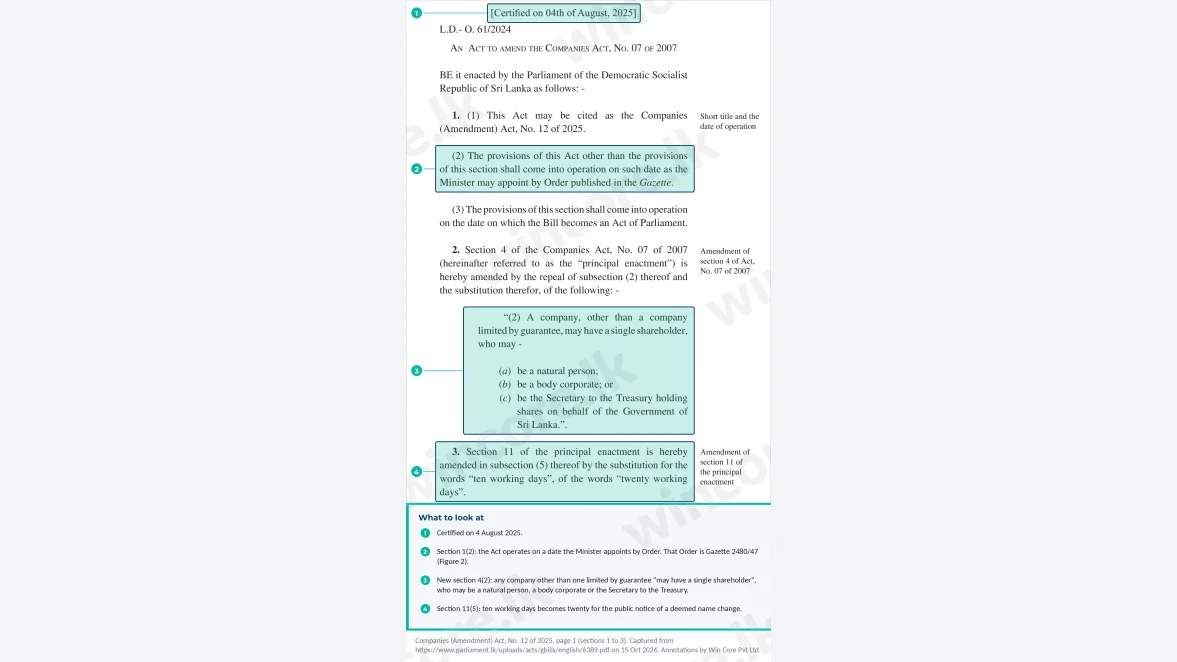
Beyond beneficial ownership, the 2025 amending Act ended bearer shares, moved allotments to working days and added a Rs 1 million general penalty.