
Company file search Sri Lanka: viewing a company's file on eROC
Anyone may inspect the Registrar's file on a company for the prescribed fee. Section 480, the Gazette item 9 fee and the eROC file search steps in order.
On this page
Last verified against the primary sources on 3 November 2026.
Company file search Sri Lanka, in brief. Section 480(1) of the Companies Act No. 7 of 2007 lets any person inspect documents in the Registrar of Companies' register on payment of the prescribed fee, subject to exceptions. Gazette 2496/03 item 9 sets Rs 1,300 excluding VAT for inspecting a file from 6 July 2026. The eROC manual describes finding an entity, giving a reason, paying and viewing available paid forms and certificates within a 24-hour session [1][2][3].
A file search can show forms and certificates held in the Registrar's file, such as incorporation documents, director changes, charges and returns, if they have been filed and are available for inspection. It is useful before buying a company, lending to one or signing a large contract. A file search download is not a certified copy. This guide sets out eleven steps: three from the law and fee schedule, one on a captured eROC File Search screen, and seven shown as diagrams based on the DRC user manual. For context, see the map of company secretarial requirements in Sri Lanka.
Company file search Sri Lanka rests on the public right in section 480(1)
Subject to section 480(3), any person may inspect documents forming part of the Registrar's register or particulars of registered documents entered in the facilities described in section 473(2), on payment of the prescribed fee. The person need not be a director or shareholder to use the general right. The Companies Act came into operation on 3 May 2007 [1][7].
- Confirm you are inspecting the Registrar's register. Section 480(1) covers documents forming part of the Registrar's register and registered particulars held electronically. Records kept by the company itself, such as its share register, follow a different inspection route under sections 119 to 121 [1].
Section 120 allows any person who gives the company written notice to inspect listed company records, including its share register and register of directors and secretaries. Under section 121, inspection is at the place where the records are kept, from 9 a.m. to 4 p.m. on working days in the period from the third through the eighth working day after notice is served. The company need not make a document available in that manner if it supplies a certified copy without charge [1].
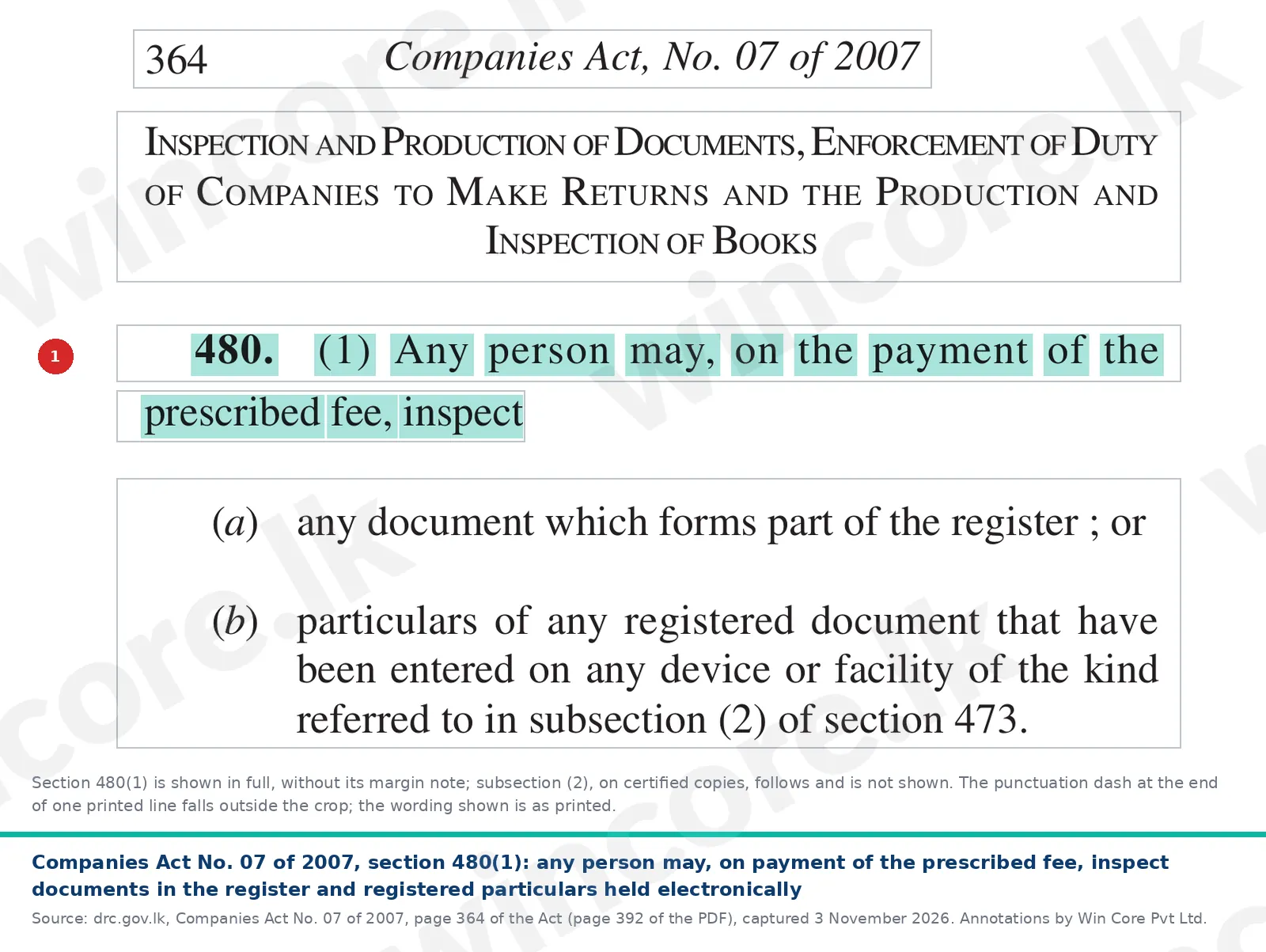
Section 480(2) is the companion right: subject to section 480(3) and payment of the prescribed fee, any person may require the Registrar to provide and certify a certificate of incorporation, a copy of or extract from another document in the register, or the specified particulars or copies or extracts of registered documents whose particulars are held in the facilities described in section 473(2) [1]. That certified copy route is covered in our guide to certified copies of company documents. Section 480 was not amended by the Companies (Amendment) Act No. 12 of 2025, in operation from 30 March 2026 [4][5]. Check for any later amendment before relying on it. To check a copy is genuine, see how to verify a Registrar certified copy.
Section 480(3) keeps some documents out of an ordinary file search
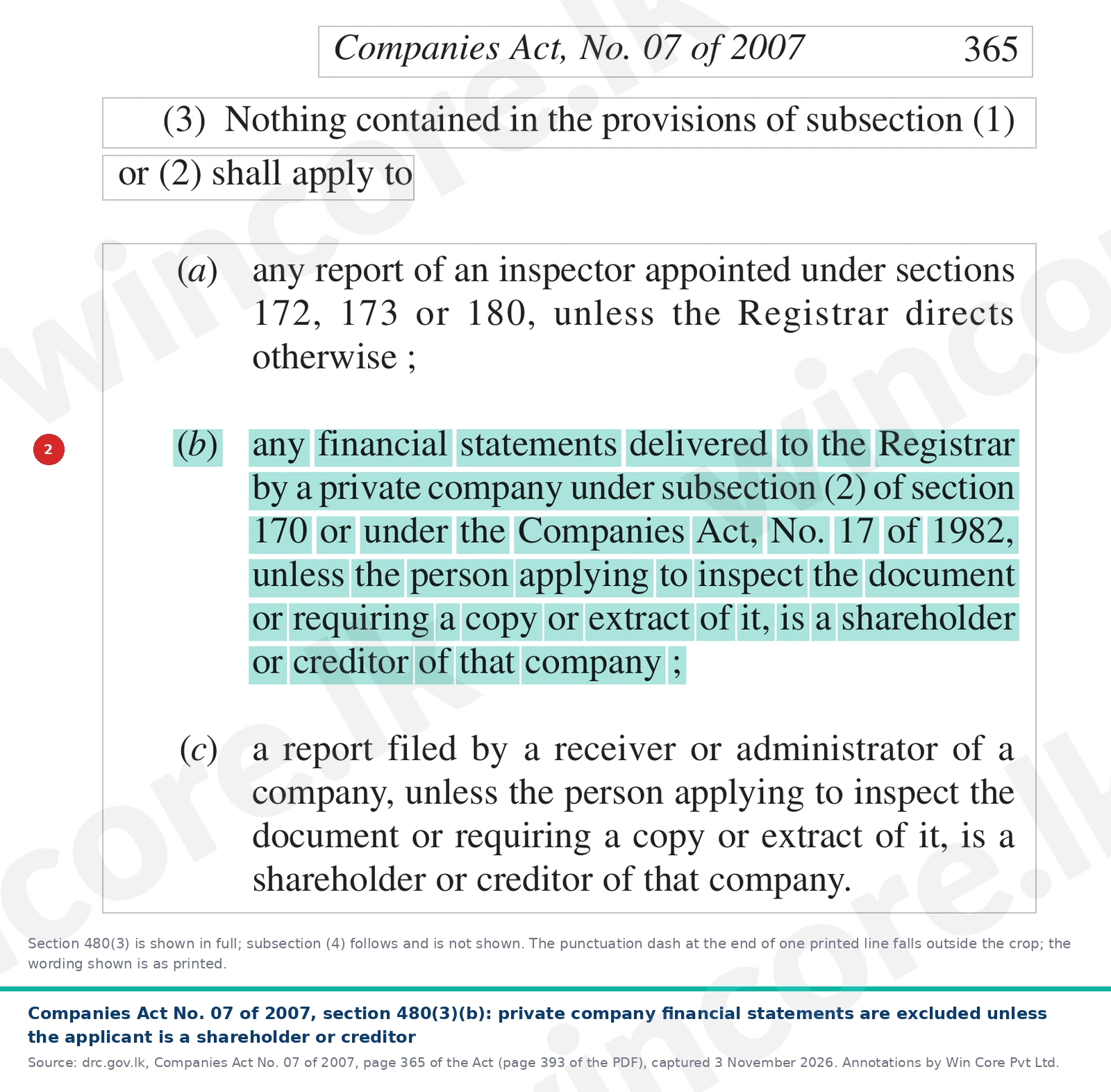
Section 480(3) limits both inspection and certified copy rights for three categories. These are reports of inspectors appointed under sections 172, 173 or 180, unless the Registrar directs otherwise; financial statements delivered by a private company under section 170(2) or under the Companies Act No. 17 of 1982; and reports filed by a company's receiver or administrator. For the last two categories, the exclusion does not apply if the applicant is a shareholder or creditor of that company [1].
- Check whether what you need is excluded. The public inspection and copy rights do not extend to a private company's financial statements delivered under section 170(2) or under the Companies Act No. 17 of 1982 when the applicant is neither a shareholder nor a creditor of that company [1].
The manual does not show how eROC presents the section 480(3) exceptions. An item missing from a search result is not, by itself, proof that the item was never filed or does not exist [2].
The fee is Gazette 2496/03 item 9, Rs 1,300 per file
The prescribed fee for inspection of a file kept by the Registrar is Rs 1,300 excluding VAT under item 9 of the Gazette 2496/03 schedule, published on 6 July 2026 [3]. Check for any later fee Order before relying on it.
- Budget for the fee and VAT. Adding the 18% standard VAT rate gives Rs 234 VAT and an estimated Rs 1,534 per file. Check the total displayed before payment. Inspecting the register of charges is a separate item 11, also Rs 1,300 excluding VAT [3][6].
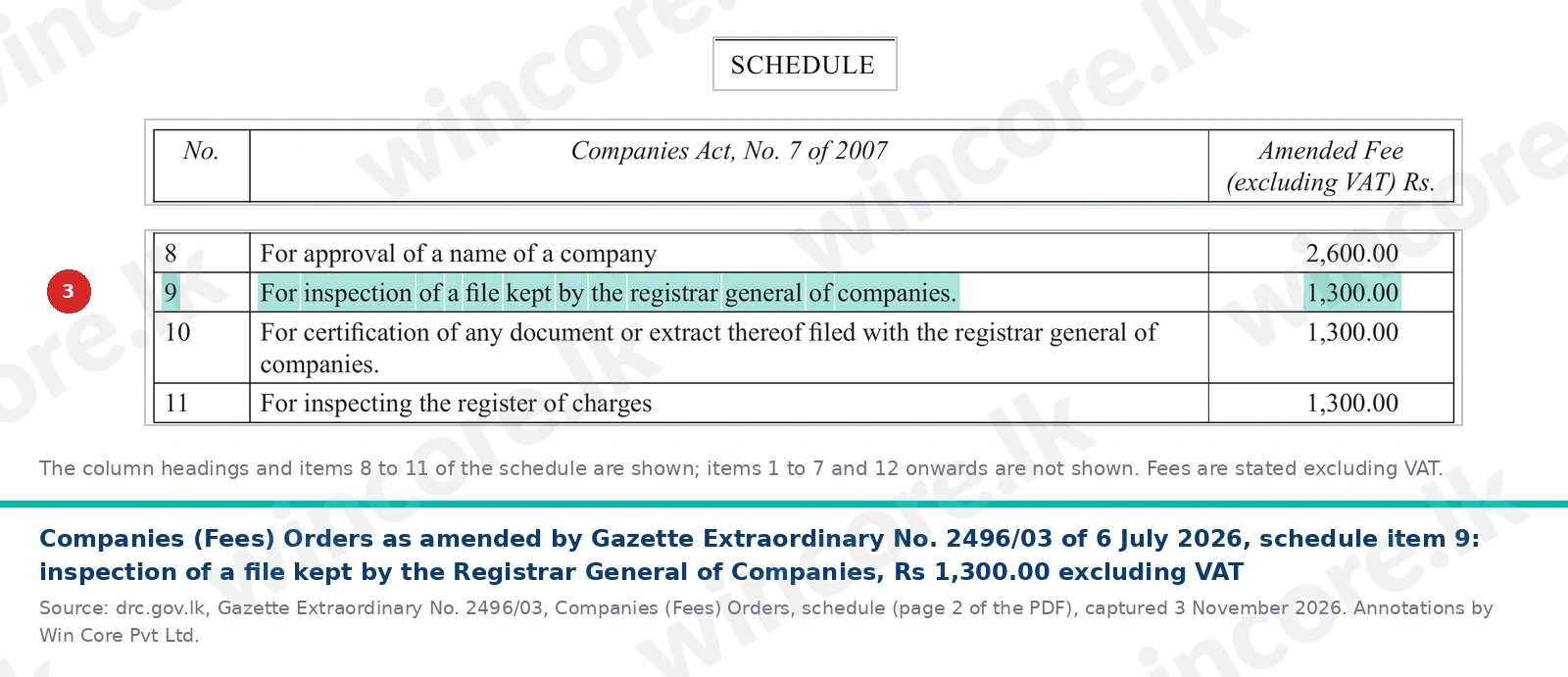
The schedule's fees are stated excluding VAT, and the Order was made under section 527 read with section 477 [3]. Section 527(2) provides for a regulation to come into operation on publication or a later specified date; the 2026 fees order specifies no later date [1][3]. The standard VAT rate has been 18% since 1 January 2024; check for any later change [6]. Fees for certification are separate, under item 10 [3].
Step 4 on the eROC File Search screen finds the entity
The manual describes an authorised public user choosing File Search from the main menu and then finding the entity [2]. Figure 4 shows that screen with empty search fields and no entity result. A separate company name search is described in the incorporation guide and can be used without logging in; it is not the paid file inspection described here [8]. For what the public can view, see a beneficial ownership search.
- Search for the entity. After clicking File Search in the main menu:
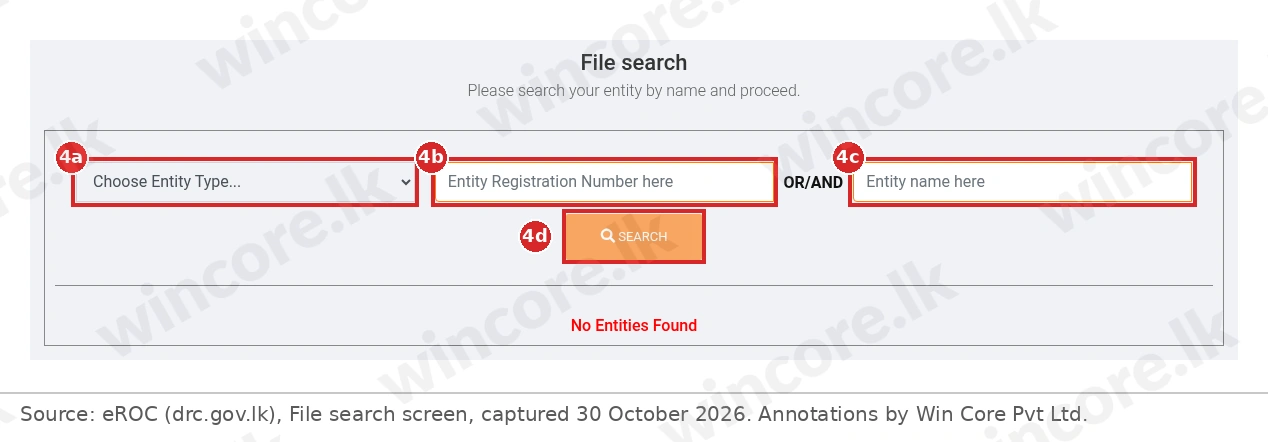
Choose the entity type that applies to the entity you want. Check the name and registration number in the result before requesting its file. This is a practical check, not a legal requirement. The manual describes searching by registration number or entity name; it does not promise a particular matching rule [2].
Steps 5 to 8 request the search, give a reason and pay
The manual shows a search result before the request and payment steps. Figure 5 summarises the steps between that result and the receipt [2].
- Click REQUEST FILE SEARCH. Use the button shown with the entity result [2].
- Give a reason for the file search and a reference number if you have one, then click NEXT to reach the payment page [2].
- Choose the payment method and confirm to continue with the payment [2]. The manual shows the payment page at its Figure 1.5.
- View or print the receipt. After successful payment, use the print receipt button [2].
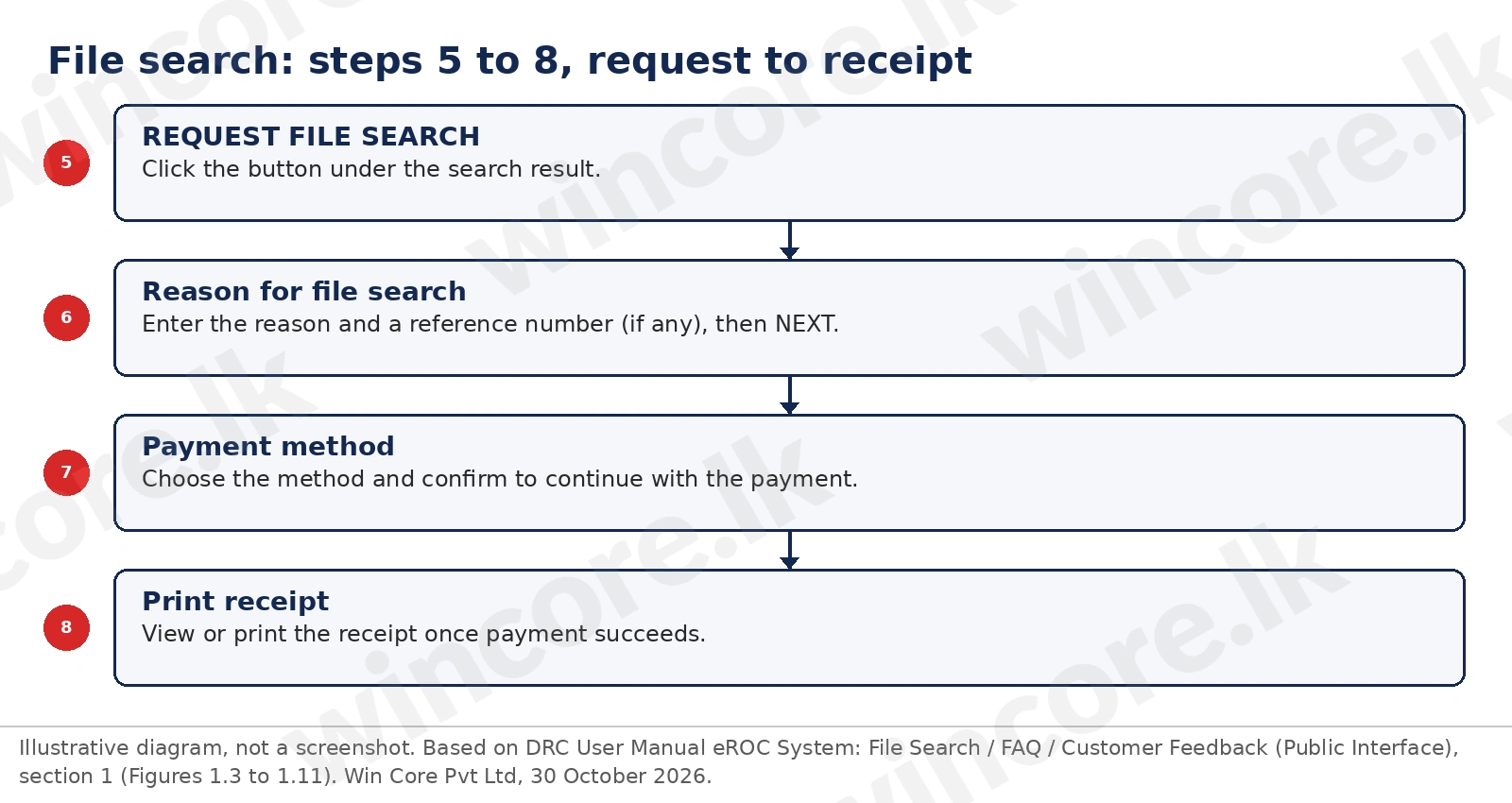
The manual asks for a reason and says to provide a reference number if there is one. It does not specify an acceptable form of reason or explain the use of the reference number [2].
Steps 9 to 11 start the search and view the file within 24 hours
After payment, the manual describes returning to the dashboard and repeating the search to start file access. It says the session expires within 24 hours and that paid forms and certificates can be viewed for 24 hours; it does not say precisely when the clock starts. Figure 6 shows the last three steps [2].
- Go back to the dashboard. Use the back to dashboard button to continue [2].
- Repeat the search and click Start file search. Follow the search steps again, then start the file search. The manual says the session expires within 24 hours [2].
- View or download the documents. The manual describes viewing paid forms and certificates, with a view or download option for each document. Follow any expiry shown by the system and download what you need promptly [2].
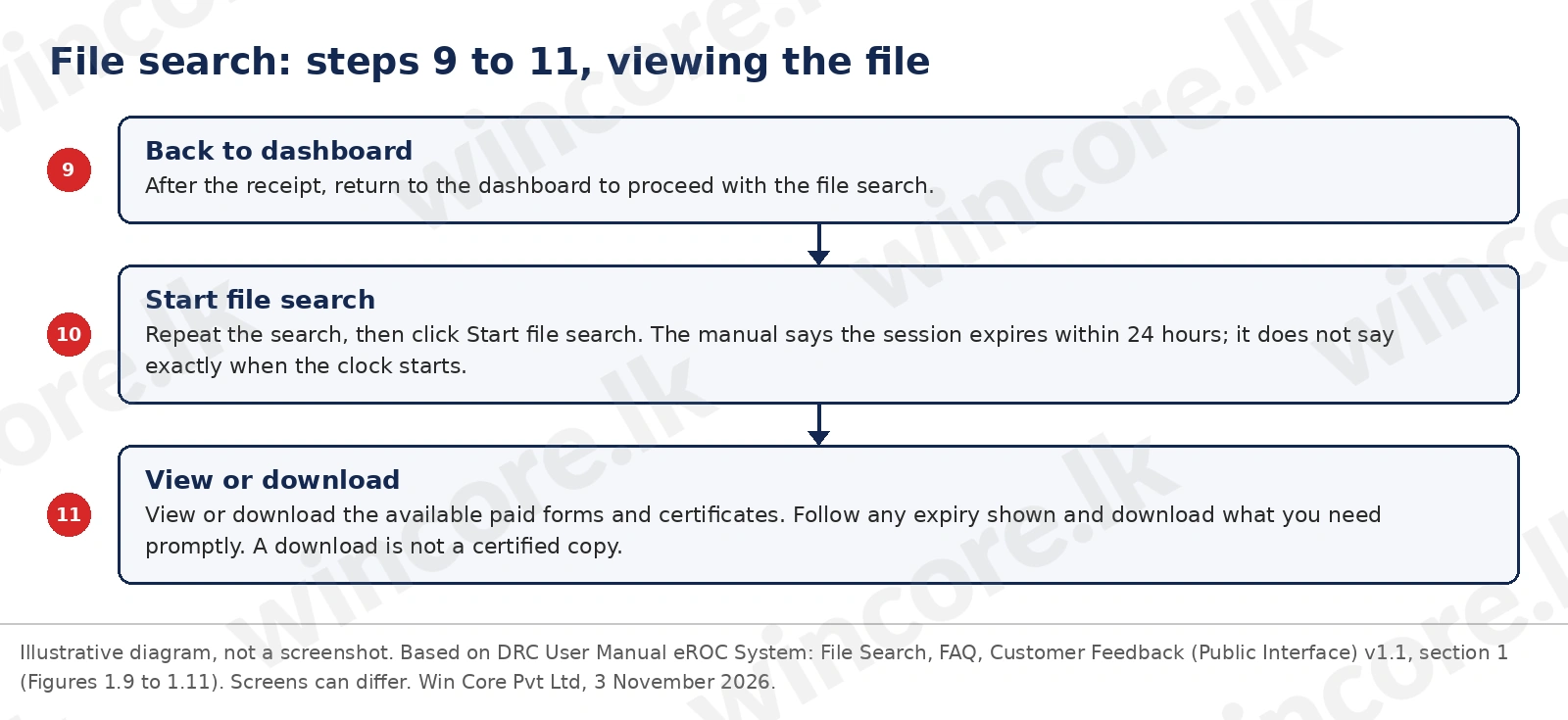
The manual says these documents cannot be used as certified copies [2]. If a bank or another authority needs a certified document, request one separately under section 480(2), subject to its exceptions and the applicable fee under item 10 [1][3].
Worked example: Company A checks a supplier's file before a contract
In this hypothetical example, Company A is a solar installation contractor about to sign a supply contract with Company B. Company A wants to see any available filings about Company B's directors and charges.
| Step | Day | What Company A does |
|---|---|---|
| Check the right | Day 0 | Relies on section 480(1); no relationship with Company B is needed |
| Search | Day 0 | File Search, entity type, Company B's registration number, Search |
| Request and pay | Day 0 | Gives the reason for the supplier check; item 9 Rs 1,300 plus Rs 234 at 18% VAT = Rs 1,534 estimated |
| View | Day 0 to Day 1 | Starts the search and promptly downloads the available director and charge filings within the session shown |
| Certified copy | If needed later | Separate request under section 480(2), item 10 |
If Company B is a private company that delivered financial statements on the Registrar's notice or under the Companies Act No. 17 of 1982, section 480(3)(b) excludes those statements from the general inspection and copy rights unless Company A is a shareholder or creditor [1]. Buyers of a company use the same search as part of their checks, which our guide to buying an existing company covers.
What this means for you
A file search is a first look at the available public record. Download what you need promptly within the session: the manual says it expires within 24 hours. A download from File Search is not a certified copy. Where a certified document is needed, request one separately. Remember that a file shows what is available from filings with the Registrar, which may differ from the company's own registers if filings are late; our guide to statutory registers explains what the company itself keeps. If you want your own company's record kept current so that a searcher sees accurate filings, our company secretarial solutions include Statutory Compliance and Corporate Document Maintenance.
Checklist: documents needed
- An eROC user account and login
- The entity type and the registration number or name
- A reason for the file search and a reference number if there is one
- An estimated Rs 1,534 per file (item 9 Rs 1,300 plus 18% VAT); check the payment total
- Time to download available documents promptly within the session
- A separate certified copy request if a certified document is needed
FAQ
Can anyone search a company's file in Sri Lanka?
Yes. Section 480(1) lets any person, on payment of the prescribed fee, inspect documents forming part of the Registrar's register and specified registered particulars held electronically. There is no general requirement to be a shareholder or director. Section 480(3) limits access to specified categories, including certain private company financial statements [1].
How much is a company file search on eROC?
Gazette 2496/03 item 9 sets Rs 1,300 excluding VAT for inspecting a file. Adding 18% VAT gives an estimated Rs 1,534 per file. Check the amount displayed before paying. Inspecting the register of charges is a separate item 11 at Rs 1,300 excluding VAT [3][6].
How long can I view the file after paying?
The manual describes a 24-hour viewing period and says the session expires within 24 hours. It does not state precisely when the clock starts. Follow any expiry shown on the portal and download the available documents you need promptly after starting the file search [2].
Can I use a file search download as a certified copy?
No. The DRC manual says a File Search download cannot be used as a certified copy. Section 480(2) provides a separate right to request certification of a document or extract, subject to the section 480(3) exceptions and the prescribed fee. Gazette 2496/03 lists certification separately at item 10 [1][2][3].
What will a file search not show?
Section 480(3) limits inspection and copies of inspectors' reports unless the Registrar directs otherwise, and of certain private company financial statements and receivers' or administrators' reports. The financial statement category covers statements delivered under section 170(2) or the Companies Act No. 17 of 1982. Shareholders and creditors have an exception for the last two categories [1].
The short version
Company file search Sri Lanka is the public right in section 480(1) to inspect the Registrar's register for the prescribed fee, subject to section 480(3). Gazette 2496/03 item 9 sets Rs 1,300 excluding VAT. The eROC manual describes choosing the entity type, searching by number or name, requesting the file, giving a reason and paying. Return to the dashboard, start the search and download available documents promptly within the session, which the manual says expires within 24 hours. The downloads are not certified copies.
Talk to us. For keeping your company's filed record and its statutory registers accurate through our Statutory Compliance and Corporate Document Maintenance work, see our company secretarial page.
WinCore Pvt Ltd
This article is general information as at 3 November 2026 and is not tax, legal or accounting advice on your specific position.
Related reading
- Shareholder access to company records Sri Lanka
- Supplier due diligence Sri Lanka: what should you check?
Sources and references (7)
- Parliament of Sri Lanka. Companies Act, No. 07 of 2007, sections 119 to 121, 170, 473, 477, 480 and 527. https://www.parliament.lk/uploads/acts/gbills/english/3776.pdf . Primary. Read 3 November 2026.
- Department of the Registrar of Companies. User Manual e-ROC System: File Search / FAQ / Customer Feedback (Public Interface), version 1.1, section 1. https://erocapiv2.drc.gov.lk/pdf/Process-D-Frontend-V1.1.pdf . Primary. Accessed 3 November 2026.
- Minister of Trade, Commerce, Food Security and Co-operative Development. Companies (Fees) Orders, Gazette Extraordinary No. 2496/03 of 6 July 2026, Schedule items 9 to 11. https://drc.gov.lk/en/wp-content/uploads/2026/07/2496-03_E.pdf . Primary. Supplied official PDF read 3 November 2026.
- Parliament of Sri Lanka. Companies (Amendment) Act, No. 12 of 2025, sections 1 to 21. https://www.parliament.lk/uploads/acts/gbills/english/6389.pdf . Primary. Read 3 November 2026.
- Minister of Trade, Commerce, Food Security and Co-operative Development. Order under section 1(2), Companies (Amendment) Act, No. 12 of 2025, Gazette Extraordinary No. 2480/47, 21 March 2026. Primary. Read 3 November 2026.
- Inland Revenue Department. Notice to VAT Registered Persons, Change of Value Added Tax Rate, PN/VAT/2023-02, 28 December 2023. https://www.ird.gov.lk/en/Lists/Latest%20News%20%20Notices/Attachments/557/PN_VAT_2023-02_28122023_E.pdf . Primary. Accessed 3 November 2026.
- Department of the Registrar of Companies. Performance Report and Annual Accounts 2018, introduction, date of operation of the Companies Act. https://www.parliament.lk/uploads/documents/paperspresented/performance-report-department-of-the-registrar-of-companies-2018.pdf . Official report, secondary source for the commencement date. Accessed 3 November 2026.
- Department of the Registrar of Companies. User Guide eROC System: Incorporation, section 2. https://erocapiv2.drc.gov.lk/pdf/3.6.1%28a%29Incorporation_Frontend.pdf . Primary. Accessed 3 November 2026.
Put these insights to work
WinCore specialists can review your current workflow, document gaps, and build a practical 90-day action plan.
Book a free consultationRecent articles


Continue reading
Explore more WinCore analysis to keep your finance, tax, and compliance roadmap moving.
The bank checks copies against originals; the IRD and the Foreign Ministry ask for Registrar-certified ones. Which you need, what it costs and who signs.

Buying a company's shares brings its whole history with it. What the transfer needs, what happens to tax losses, and when a new company is simpler.
Which registers a Sri Lankan company must keep, where they may be kept, who can inspect them, how long to keep them and the ten-working-day notices.