
Prior approval Registrar of Companies: the eROC request in nine steps
Some company changes need the Registrar's approval before they are made. Which ones, how the eROC Request for Prior Approval works, and what comes next.
On this page
Last verified against the primary sources on 3 November 2026.
Prior approval Registrar of Companies, in brief. The DRC eROC guide requires approval before a company submits a change of balance sheet date. The Companies Act also requires prior written approval for certain other actions, including alterations to the articles of a company licensed under section 34 and omissions of subsidiary statements under section 153(7). The Companies Act came into operation on 3 May 2007 [1][2][5].
The eROC Request for Prior Approval is a separate step from a later filing where one is needed. This article follows a hypothetical private construction firm, Company A, which wants to change its balance sheet date. Steps 1 and 9 frame the request; steps 2 to 8 follow the DRC Process B guide. The diagrams are redrawn from the guide. The accompanying eROC screens were captured on 31 October 2026 with identifying details blocked. For context, see our map of company secretarial requirements in Sri Lanka.
Prior approval Registrar of Companies requests start with knowing which change needs one
- Identify the change and its section. The following examples do not cover every approval under the Act [1]:
- Section 171(3) and (4): the subsection mentions approval before a change of balance sheet date and a period of no more than fifteen months between dates. Section 171(5) separately sets the fifteen-month limit. The DRC guide requires prior approval before a change application [2].
- Section 149(1): accounting records must be kept in Sri Lanka unless the Registrar permits them to be kept abroad. Permission depends on the Registrar considering this not prejudicial to the national economy or to the interests of the company's shareholders.
- Section 34(4): a company licensed under section 34 needs the Registrar's prior written approval before altering its articles.
- Section 153(6) and (7): a company may omit a subsidiary's statements from group financial statements on the grounds in subsection (6) only with the Registrar's prior written approval. The grounds depend on the board's opinion that inclusion is impracticable, of no real value to shareholders because the amounts are insignificant, or would involve expense or delay out of proportion to the value to shareholders; that the result would be misleading or harmful to the company's or a subsidiary's business; or that their businesses are so different they cannot reasonably be treated as a single undertaking. The Registrar may attach conditions.
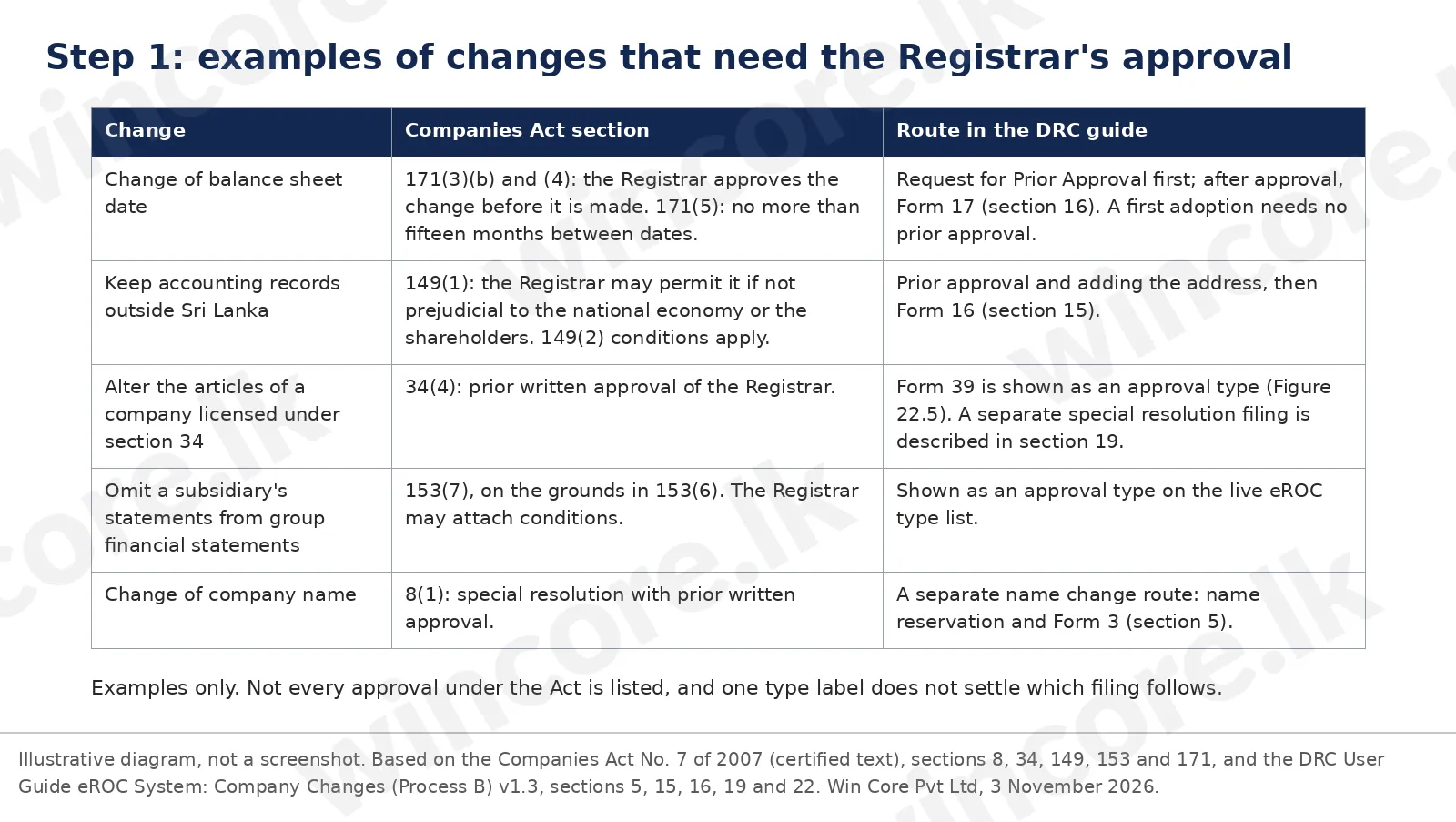
Section 8(1) also requires prior written approval for a company name change by special resolution. The guide describes name reservation and Form 3 in a separate name change route, so do not assume every approval uses the Request for Prior Approval tile [1][2]. Other provisions address different decisions, including section 174 on an inspector's investigation of a related body corporate.
The wording of section 171(3) needs care. It says that a company changing its date shall be required to have a balance sheet date in a calendar year if both conditions in paragraphs (a) and (b) are met. On our reading, that wording should not be presented as an automatic exemption from the annual date requirement. The guide's practical instruction is to obtain approval before submitting a change application [1][2].
Section 149 has further conditions. If accounting records are kept outside Sri Lanka, the company must keep the specified accounts and returns at a place in Sri Lanka and give notice of the relevant locations to the Registrar. The accounts and returns must disclose the financial position with reasonable accuracy at intervals of no more than six months and enable the required statements and other documents to be prepared [1].
The guide's request screen shows Form 39 as an approval type for a proposed article change for a licensed guarantee company. Its separate Form 39 section describes a special resolution filing. The type shown on the approval screen does not itself establish that every approval is followed by Form 39 [2]. The 2025 amendment, in operation from 30 March 2026, did not amend sections 34, 149, 153 or 171 [4].
Steps 2 and 3 open the Prior Approval list and create a new request
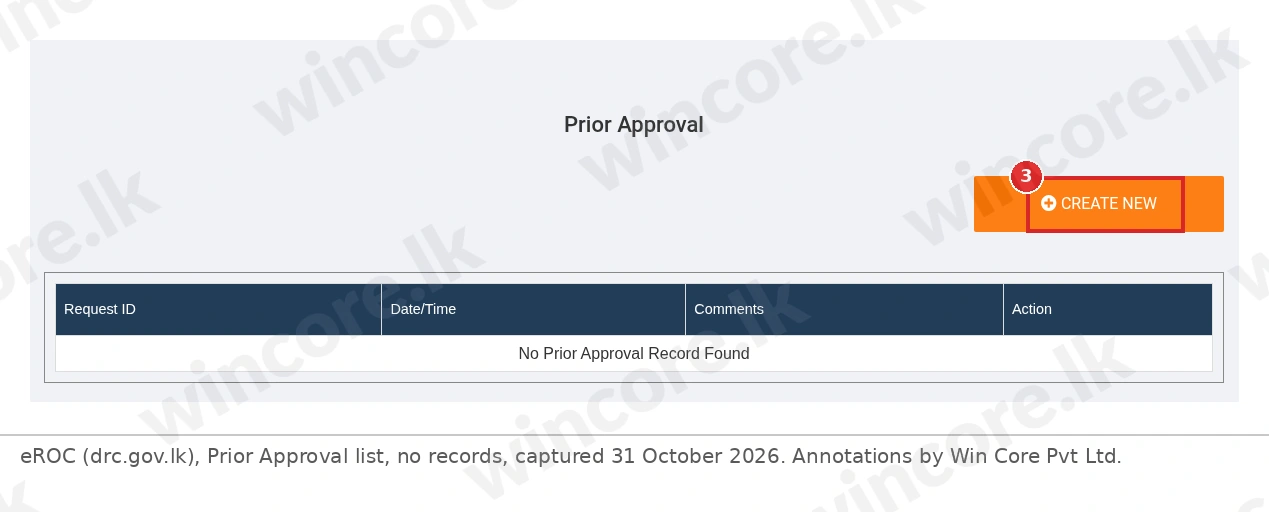
The request starts from the Other Changes list. Figure 2 shows the list screen as an empty wireframe.
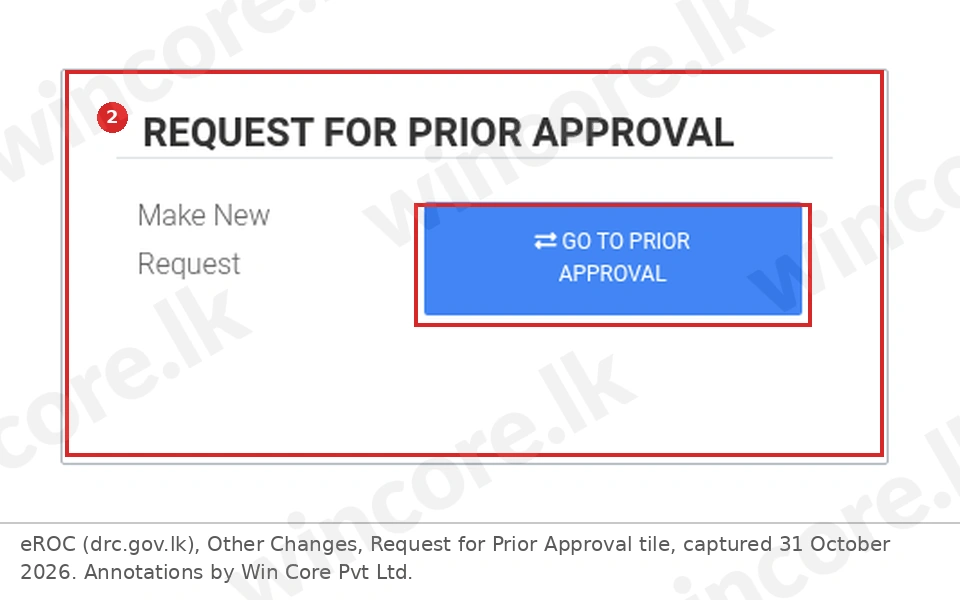
- Open Other Changes, then Request for Prior Approval. On the captured tile the button reads GO TO PRIOR APPROVAL [2].
- Click CREATE NEW. The list has columns for Request ID, Date Time, Comments and Action [2].
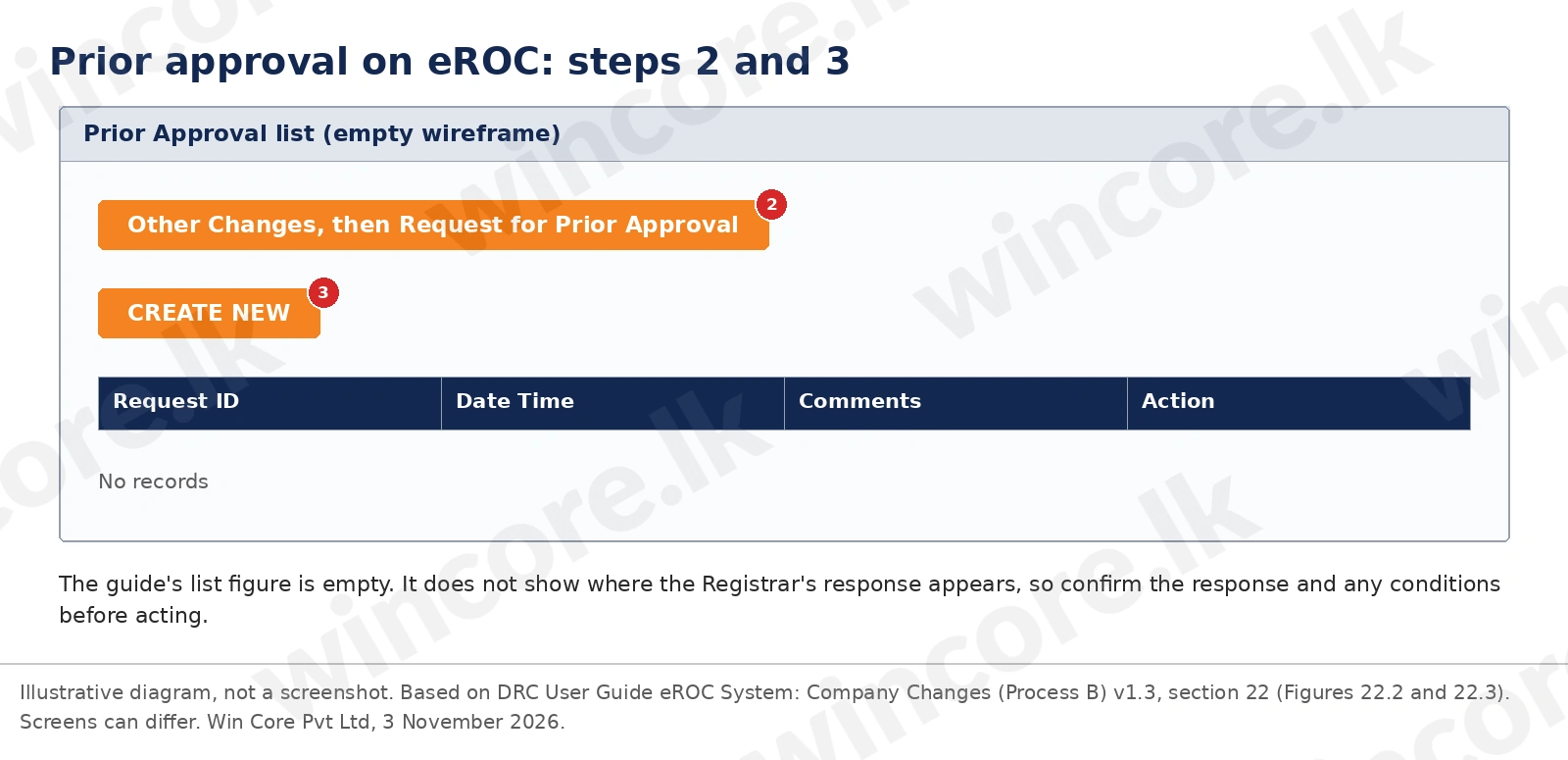
Figure 3 and Figure 4 are the tile and list captured on 31 October 2026. The list shows no records.
Steps 4 to 8 fill the three-part request and submit it to the Registrar
The request has three parts: Company Details, Information and Upload Documents. The guide directs the applicant to move through the screen, select the appropriate type, enter the details, upload documents and submit [2]. Figure 5 shows the sequence.
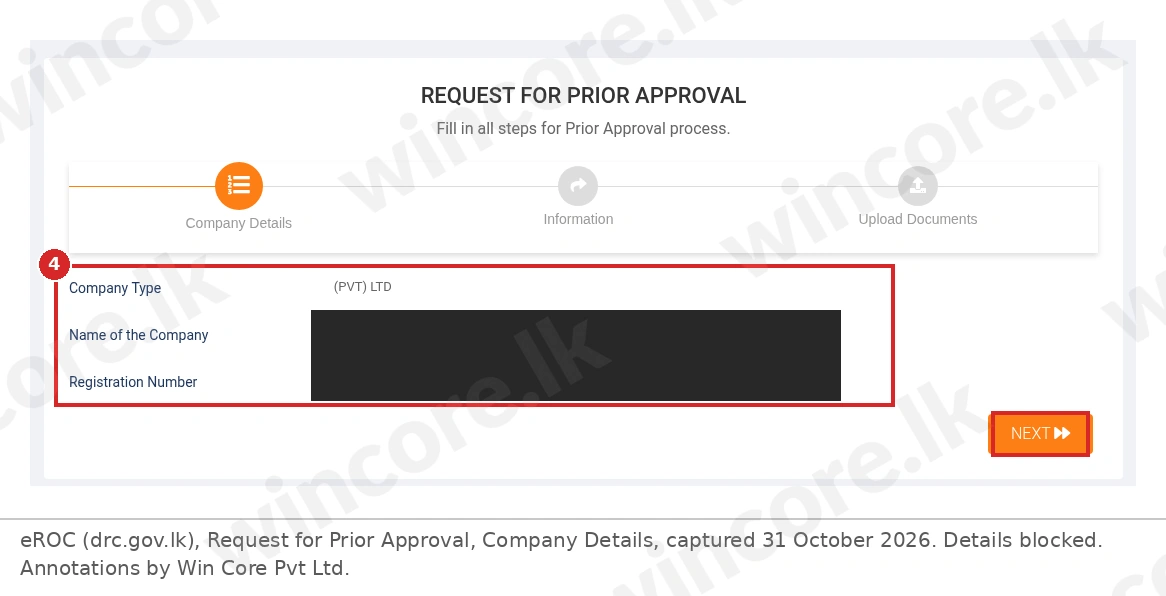
- Check Company Details and click NEXT. The screen shows the company type, name and registration number [2].
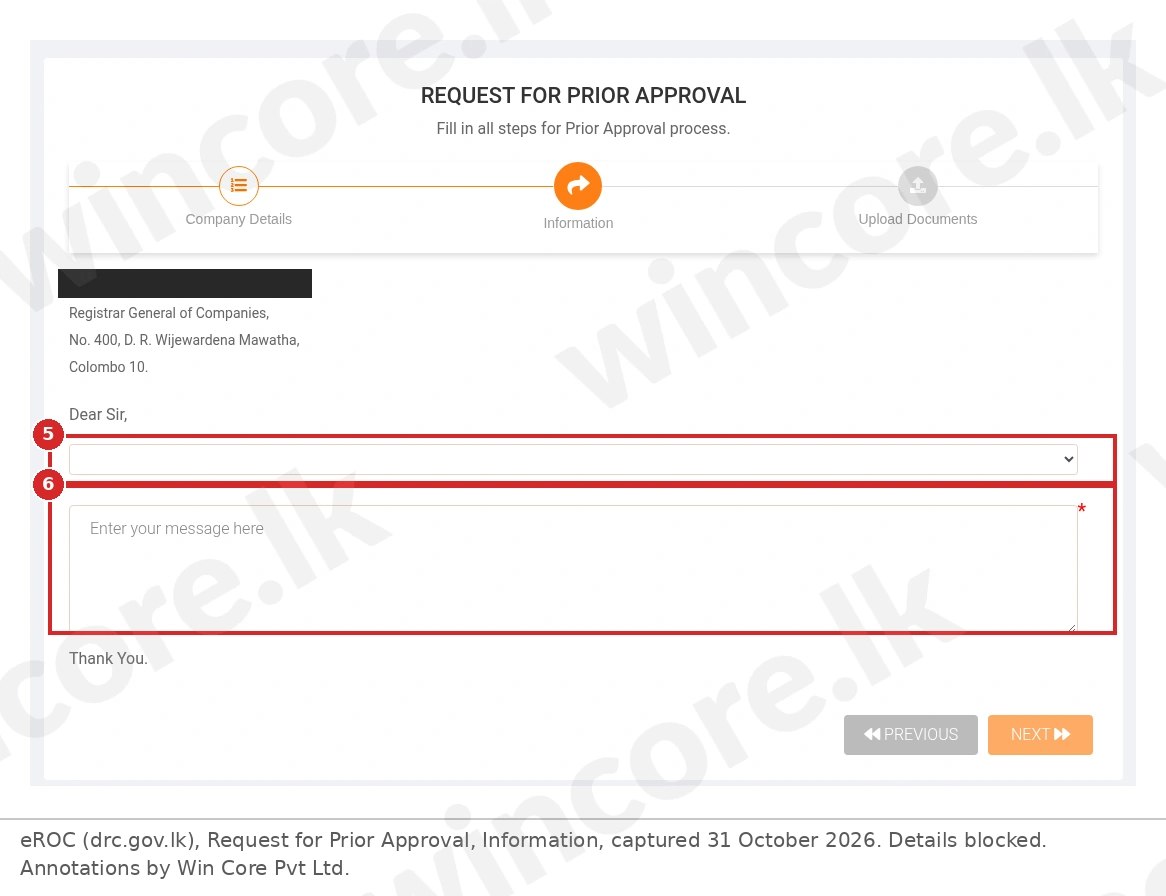
- Select the prior approval type in the Information part. The captured screen is laid out as a letter to the Registrar General of Companies. One type shown on the captured screen concerns omitting subsidiary statements under section 153(7).
- Write the message. The message box is marked as required in the guide's figure. State the action requested and the relevant reasons. Preparing a clear explanation is practice, not a separate statutory requirement stated in section 22 of the guide.
- Upload the documents under OTHER DOCUMENTS in the Upload Documents part. Enter a document name, use UPLOAD and follow the screen's instructions [2]. A board resolution can support a request; the guide does not say one is mandatory for every type.
- Click SUBMIT [2].
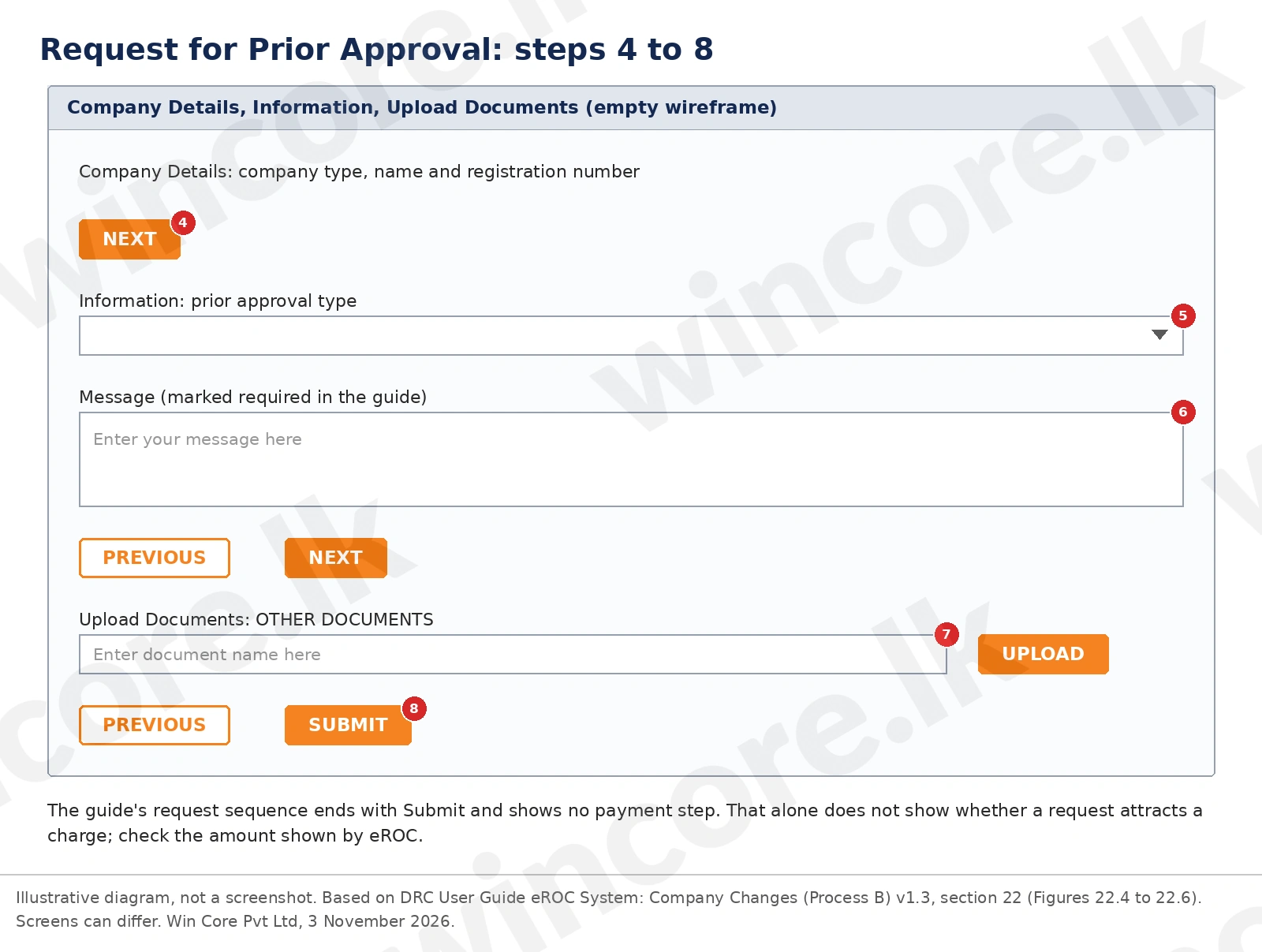
Figure 6 to Figure 9 are the screens in step order, captured on 31 October 2026. The entries in Figure 8 and Figure 9 are sample entries typed for this tutorial.
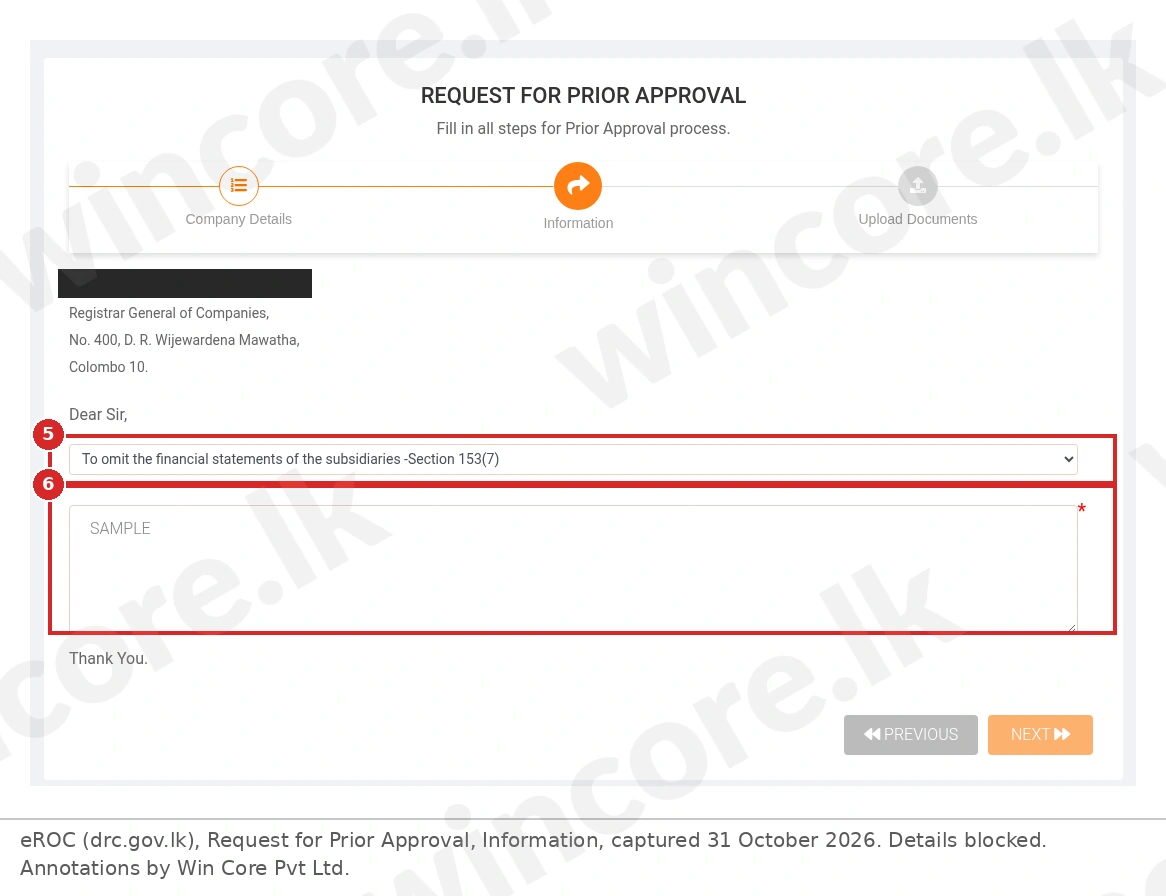
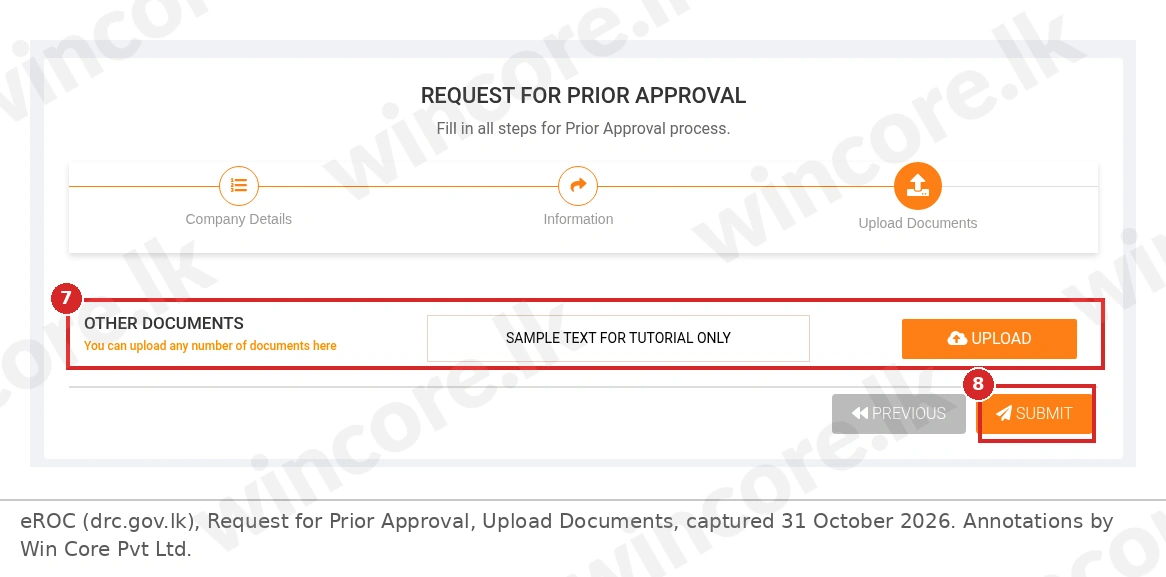
The guide's request sequence ends with Submit and does not show a payment step. Gazette 2496/03 has no separately named prior approval item, but item 7 covers a category of documents. Those sources alone do not establish whether a particular request attracts a charge. Check the amount displayed by eROC before submitting or paying [2][3].
Step 9 files the change itself once the Registrar approves
Approval and the later notice serve different purposes. Section 171(4) allows the Registrar to approve a change of balance sheet date with or without conditions. Section 171(6) says adoption or change takes effect when the Registrar receives notice to that effect [1].
- Complete the relevant follow-up. For a balance sheet date change, the guide directs the applicant, after approval, to Form 17. Enter the details, download the form, sign it, scan and upload it, then follow the payment steps. For accounting records, the guide describes Form 16 and adding the address after approval [2]. Follow any conditions in the approval and keep it with the company records. Keeping a copy is practice, not a separate legal requirement stated in the guide.
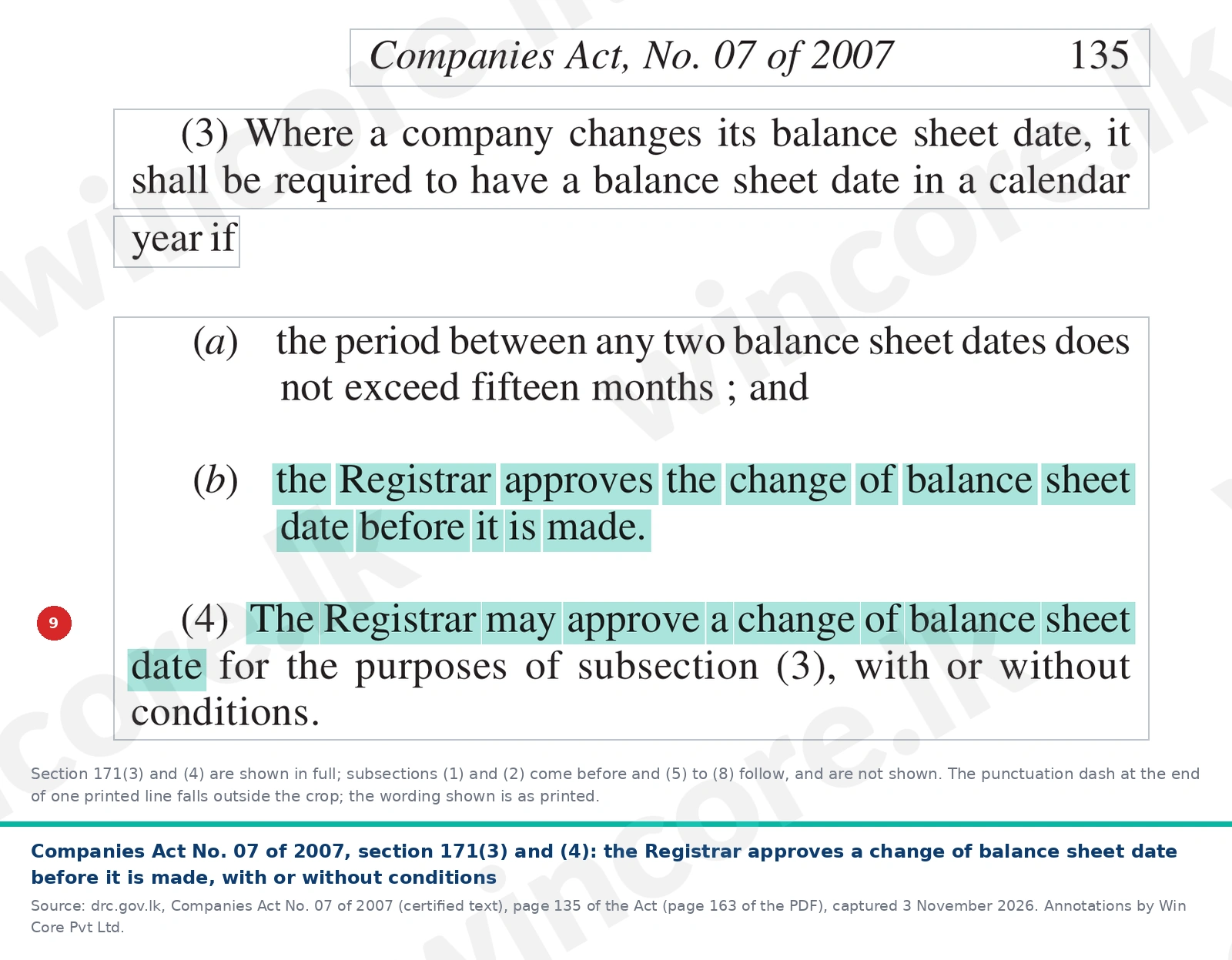
The guide says prior approval is not required to submit the first adoption of a balance sheet date. That statement is about adoption in the eROC process, not every other approval that might apply to a company [2].
Worked example: Company A asks to move its balance sheet date
Company A, a construction firm, has a 31 March balance sheet date and wants 31 December, so its year end falls outside its busiest quarter.
| Step | What Company A does | Fee |
|---|---|---|
| 1 | Identifies section 171 and the guide's approval step | No fee is established for identifying the rule |
| 2 to 3 | Opens Request for Prior Approval and clicks CREATE NEW | Request charge unverified; check eROC |
| 4 to 6 | Selects the balance sheet date type and explains the proposed change | Request charge unverified; check eROC |
| 7 to 8 | Uploads its supporting board resolution and submits | Request charge unverified; check eROC |
| 9 | After approval, completes Form 17 | On our reading, item 7: Rs 2,600 plus Rs 468 at 18 percent VAT = Rs 3,068 [3][6] |
The proposed interval is nine months, within the fifteen-month limit in section 171(5). The example does not assume that approval is automatic. The Form 17 estimate uses the item 7 document fee with standard VAT applied; the guide does not itself state that amount, and separate payment processing charges are not included. On our reading, item 7 applies to the Form 17 notice; check the amount displayed at payment. Gazette 2496/03 was published on 6 July 2026 and specifies no later starting date. Under section 527(2), regulations commence on publication unless a later date is specified. The standard VAT rate of 18 percent took effect on 1 January 2024 [1][3][6]. Check for any later fee Order or VAT change before relying on these amounts.
Our guide to changing the financial year end for tax covers the tax accounting period. Our note on the first financial year of up to 15 months covers the first-year rule in section 171(2).
What this means for you
Identify the provision and use the route for that request. For a balance sheet date change, prepare the proposed date and reason, obtain approval and follow the guide's Form 17 steps. The list has a Comments column, but the guide does not say that every decision appears there, so confirm the response and any conditions before acting. Keep the approval and supporting papers with the company records as good practice. Our company secretarial services include Statutory Compliance and Board Meeting Management.
Checklist: documents needed
- The provision and the action for which approval is sought
- The proposed change and a short written explanation
- Relevant supporting documents, such as a board resolution where appropriate
- Access to the company's eROC record
- The details for any follow-up form, such as the new balance sheet date
- For Form 17, allow Rs 2,600 on the item 7 reading, or Rs 3,068 if VAT applies at 18 percent; check the amount and any request charge shown by eROC
FAQ
Which company changes need the Registrar's prior approval in Sri Lanka?
Examples include altering the articles of a company licensed under section 34 and omitting a subsidiary's statements under section 153(7). Section 8(1) covers a name change, and section 149(1) requires permission to keep accounting records abroad. The DRC guide calls for approval before a balance sheet date change [1][2].
How do I request prior approval on eROC?
Open Other Changes, select Request for Prior Approval and click Create New. Check the company details, choose the type, enter the message, move to Upload Documents and submit the support for that request. The DRC Process B guide gives this sequence; a name change has its own route [2].
Is there a fee for prior approval?
The charge for the request itself is not established by the guide and Gazette alone. The guide shows no payment step in its request sequence, and Gazette 2496/03 has no item named prior approval, but its item 7 covers documents generally. On our reading, item 7 applies to Form 17: Rs 2,600 excluding VAT, or Rs 3,068 if VAT applies at 18 percent [2][3][6].
Do I need prior approval to adopt a balance sheet date for the first time?
The DRC guide says prior approval is not required to submit a first adoption application. It distinguishes adoption from a change application, for which the guide requires approval first. Section 171(2) also provides a first-year exception when the stated following-year and fifteen-month conditions are met [1][2].
The short version
Prior approval Registrar of Companies requests depend on the action and the relevant provision. For a balance sheet date change, the DRC guide directs the company to request approval on eROC before submitting Form 17. The guide shows no payment step for the approval request, but the request charge is unverified. On our reading, item 7 applies to Form 17: Rs 2,600 excluding VAT, or Rs 3,068 at 18 percent VAT. Check the payment screen for the amount due.
Talk to us. For Statutory Compliance and Board Meeting Management, see our company secretarial page.
WinCore Pvt Ltd
This article is general information as at 3 November 2026 and is not tax, legal or accounting advice on your specific position.
Related reading
- Form 17 eROC: adopting or changing a balance sheet date in 11 steps
- How to change your financial year-end for tax compliance in Sri Lanka
- First financial year 15 months Sri Lanka: the section 171 test
Sources and references (6)
- Department of the Registrar of Companies. Companies Act, No. 07 of 2007, sections 8, 34, 149, 153, 171, 174, 477 and 527. https://www.parliament.lk/uploads/acts/gbills/english/3776.pdf . Primary. Accessed in the supplied certified PDF on 3 November 2026.
- Department of the Registrar of Companies. User Guide eROC System: Company Changes (Process B), version 1.3, sections 5, 15, 16, 19 and 22. https://erocapiv2.drc.gov.lk/pdf/Process%20b_frontend_V1.3.pdf . Primary. Accessed 3 November 2026.
- Minister of Trade, Commerce, Food Security and Co-operative Development. Companies (Fees) Orders, Gazette Extraordinary No. 2496/03 of 6 July 2026, Schedule items 1 to 25, especially item 7. https://drc.gov.lk/en/wp-content/uploads/2026/07/2496-03_E.pdf . Primary. Accessed in the supplied Gazette PDF on 3 November 2026.
- Parliament of Sri Lanka. Companies (Amendment) Act, No. 12 of 2025, sections 1 to 21; operation from 30 March 2026 under Gazette Extraordinary No. 2480/47. https://www.parliament.lk/uploads/acts/gbills/english/6389.pdf . Primary. Act and supplied operation order accessed 3 November 2026.
- Department of the Registrar of Companies. Performance Report 2016, introduction, commencement of the Companies Act. https://www.parliament.lk/uploads/documents/paperspresented/performance-report-department-of-registrar-of-companies-2016.pdf . Official report, secondary source for the commencement date. Accessed 3 November 2026.
- Inland Revenue Department. Notice PN/VAT/2023-02: Change of Value Added Tax Rate, 28 December 2023. https://www.ird.gov.lk/en/Lists/Latest%20News%20%20Notices/Attachments/557/PN_VAT_2023-02_28122023_E.pdf . Primary. Accessed 3 November 2026.
Put these insights to work
WinCore specialists can review your current workflow, document gaps, and build a practical 90-day action plan.
Book a free consultationRecent articles

Continue reading
Explore more WinCore analysis to keep your finance, tax, and compliance roadmap moving.

Changing a company's year-end in Sri Lanka: the section 20(2) application to the IRD, what does not move, the AGM consequence and the controls to rebuild.

A new company's first year end, counted from incorporation: when the Companies Act allows a long first period, and why the tax year does not stretch.

A director's new address, name or occupation is a change in particulars under section 223. How the twenty working days run and the eROC Form 20 steps.